Customer reviews are the lifeblood of improved service and reputation management. But analyzing them is often a mess. You're either logging into Yelp five times a day, or you're copy-pasting text into a spreadsheet that nobody reads.
This manual process is a "data silo" waiting to happen. Reviews sit on Yelp, while your product team works in Jira, your support team in Zendesk, and your marketing team in... well, Slack mostly.
The solution is to turn reviews into actionable data.
By piping Yelp reviews directly into Airtable, you transform static text into a dynamic database. Suddenly, you can:
- Tag reviews by feature request or bug.
- Assign negative reviews to support agents for follow-up.
- Analyze sentiment trends over time.
This guide shows you how to build a fully automated Yelp-to-Airtable pipeline using no-code tools.
Why Airtable for Reputation Management?
Spreadsheets (Excel/Google Sheets) are for numbers. Airtable is for workflows.
When you put reviews in Airtable, you can build specific views for different teams:
- "Urgent Triage" View: Filters for 1-2 star reviews from the last 24 hours.
- "Feature Requests" View: Filters for keywords like "wish," "missing," or "add."
- "Sentiment Dashboard" Interface: Visual charts showing your average rating per month.
But Yelp doesn't have an "Export to Airtable" button. That's where we need a bridge.
Step 1: Design Your Airtable Base
Before we get the data, we need a place to put it. Create a new Base in Airtable (or a new Table in your existing base) with these columns:
| Field Name | Type | Purpose |
|---|---|---|
| Reviewer Name | Single Line Text | Who wrote it |
| Rating | Number (1-5) | Star count |
| Review Date | Date | When it was posted |
| Content | Long Text | The actual review body |
| Status | Single Select | To Do, In Progress, Done |
| Feature Tags | Multiple Select | Bug, Pricing, UX, Service |
| Yelp URL | URL | Link back to the review |
Pro Tip: Add a "Last Modified Time" field to help with sorting.
Step 2: Extract Reviews with Lection
We need to get the reviews off the Yelp page. We could use a generic scraper, but Yelp is notorious for complex layouts and anti-scraping measures.
Lection handles this gracefully because it runs in your browser, seeing exactly what you see.
-
Install Lection: Get it from the Chrome Web Store.
-
Navigate to Yelp: Go to the reviews page of the business you want to track.
-
Create a Definition:
- Open Lection.
- Click on the Reviewer Name, Star Rating, Date, and Review Text of the first review.
- Lection's AI will auto-select the rest of the reviews on the page.
- Note: Ensure you select the "next page" button if you want to scrape historically.
-
Test the Extraction: Click "Extract" to verify the data looks clean.
Step 3: Automate the Pipeline
Doing this once is a snapshot. Doing it daily is a system.
Option A: The "One-Off" Import (Beginner)
If you just want to analyze the past year of reviews:
- Run the extraction in Lection.
- Download as CSV.
- Use Airtable's "CSV Import" app (Apps sidebar > Import from CSV) to populate your table.
Option B: The "Live Feed" (Advanced & Recommended)
To get new reviews automatically as they are posted:
-
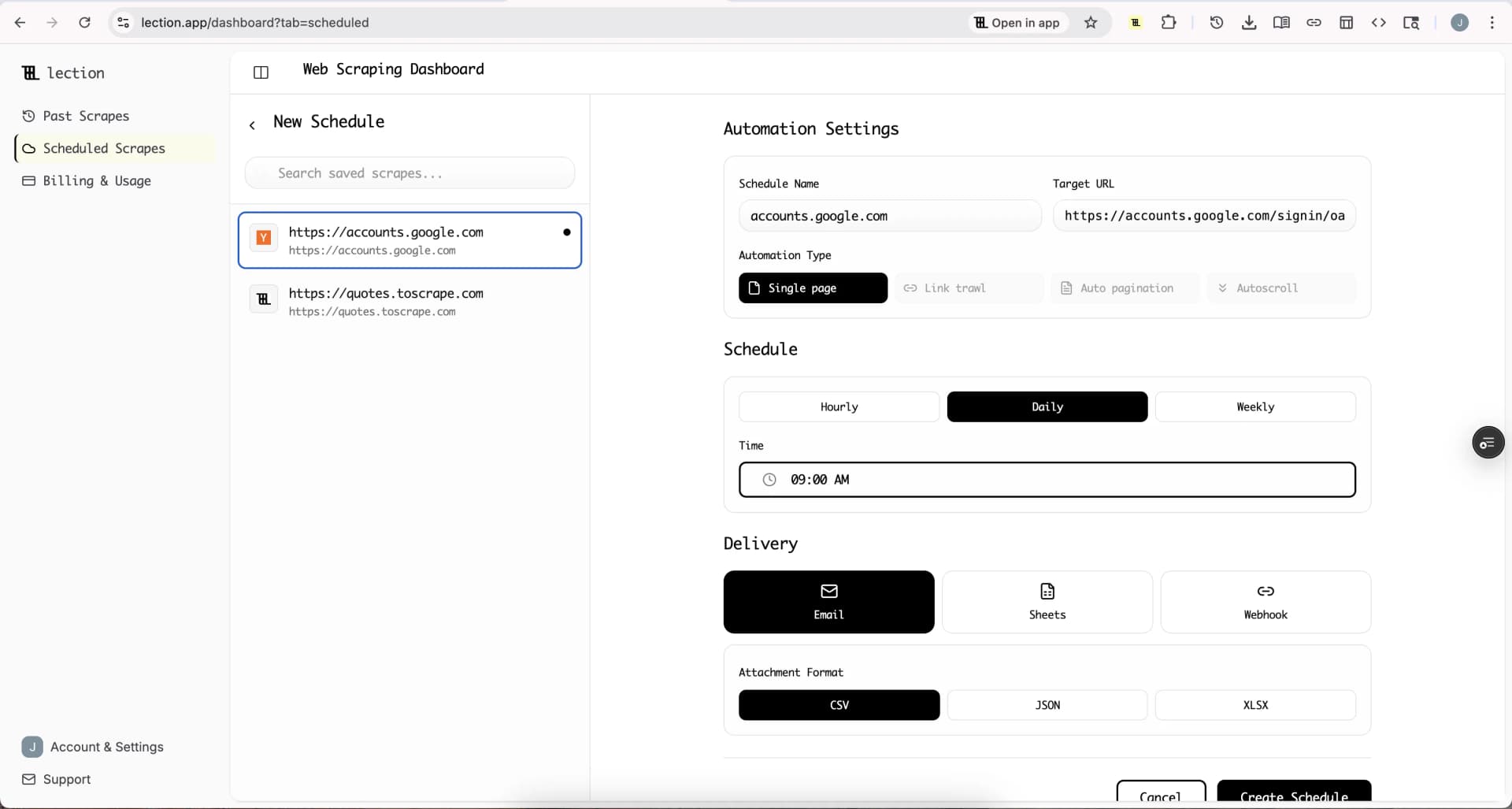
Set up a Cloud Scrape in Lection:
- Go to the Lection Dashboard.
- Select your Yelp definition.
- Set the Schedule to "Daily."
-
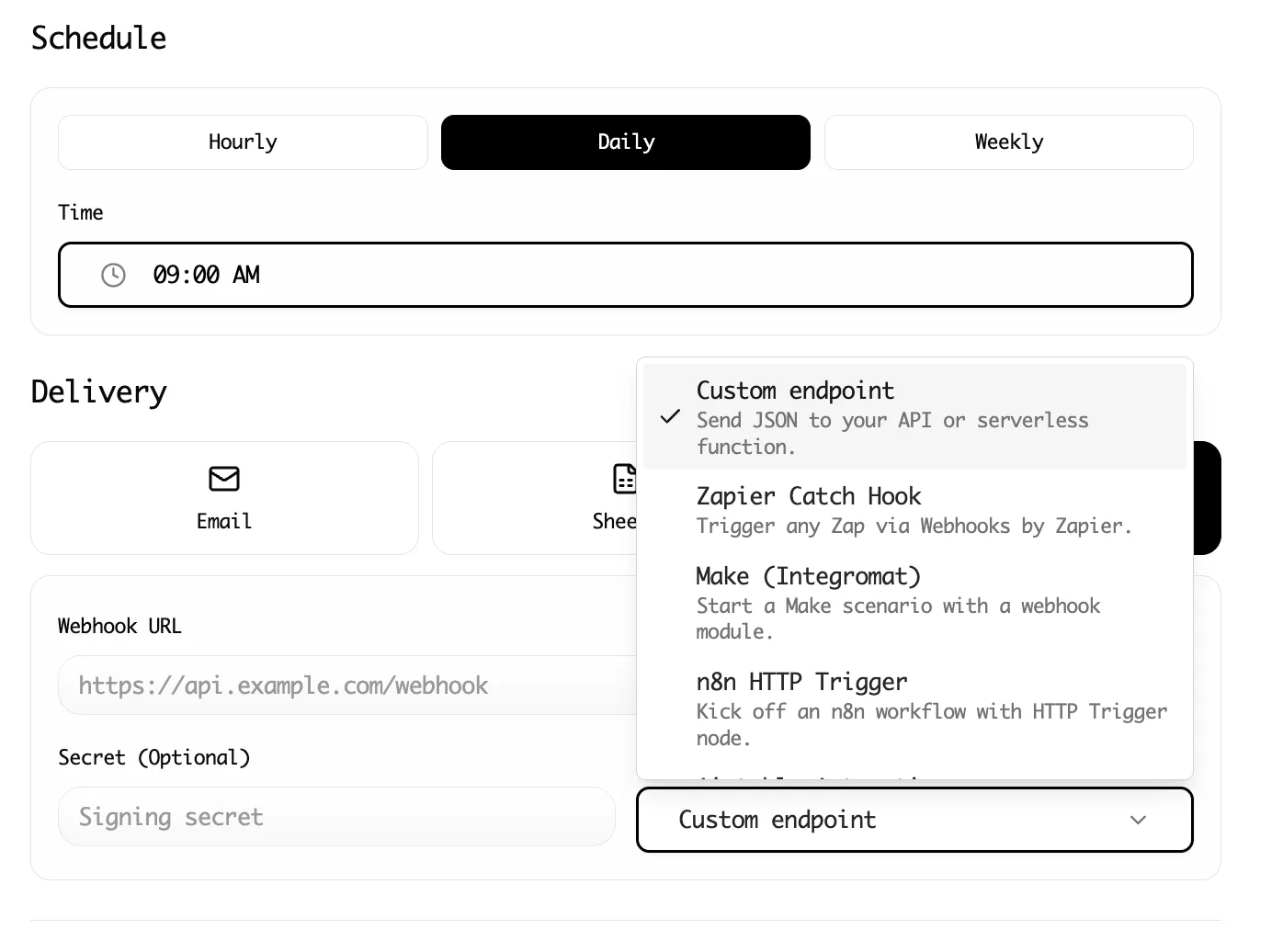
Connect to Webhooks (Zapier/Make):
- In Lection, go to the Integration tab.
- Choose Webhook.
- In Zapier, create a generic "Catch Hook" trigger and paste that URL into Lection.
-
Map to Airtable:
- In Zapier, add an action: Airtable - Create Record.
- Map the incoming data fields (Name, Rating, Content) to your Airtable columns.
Now, every morning, Lection checks for new reviews and sends them straight to your Airtable base.
What To Do With the Data (The "Analysis" Part)
Now that your data is flowing, here are three high-impact workflows you can build immediately:
1. The "Firefighter" Alert
Create an Airtable Automation:
- Trigger: When record is created AND Rating < 3.
- Action: Send Slack message to #support-triage with the review content.
- Result: You catch bad experiences within 24 hours, often fast enough to reply and win the customer back before they churn.
2. The Product Roadmap Feeder
Review your "Content" field. Search for high-frequency keywords.
- Do people keep mentioning "parking"?
- Is "slow service" appearing more on Fridays?
- Tag these reviews. Then, use Airtable's Interface Designer to build a bar chart of "Complaints by Category." Show this to your operations manager. Data speaks louder than anecdotes.
3. AI Sentiment Analysis (Next Level)
Since you're using Airtable, you can add an AI Field (if you're on a paid plan) or use a script to call OpenAI.
- Prompt: "Analyze this review and return a sentiment score from -1 to 1, and extract 3 key topics."
- Result: You get automated tagging without a human having to read every single line.
Summary
Reputation management isn't about staring at Yelp. It's about moving the feedback to where your team works.
By bridging Yelp to Airtable with Lection, you stop reacting to "noise" and start managing data. You save hours of copy-pasting and gain the ability to spot trends before they become crises.
Ready to build your review pipeline? Install Lection and automate your first extraction today.