Every e-commerce manager knows the sinking feeling: discovering that a competitor dropped their prices three days ago, and you only noticed when a customer mentioned it during a support call. By then, you have already lost a week of sales to a competitor who simply checked your prices before you checked theirs.
Manual price monitoring is a treadmill. You open competitor websites, squint at product pages, copy numbers into a spreadsheet, and repeat this ritual across dozens of SKUs. One operations analyst described the process as "a 4-hour weekly ritual that felt like the most important waste of time on my calendar." The data was critical but the process was soul-crushing.
This guide shows you how to build an automated competitor price tracker in Google Sheets. We will cover everything from basic approaches to production-ready solutions that run while you sleep, including when to use tools like Lection to handle the sites that break simpler methods.
Why Competitor Price Tracking Matters in 2026
The retail landscape has fundamentally changed. With 89% of consumers comparing prices across multiple sites before purchasing, being even 5% higher than competitors on key products means losing sales you never knew you missed.
Dynamic pricing is now standard. Amazon alone makes millions of price changes daily. Major retailers adjust prices based on demand, inventory, competitor movements, and even time of day. If you are still checking prices manually once a week, you are operating on week-old intelligence in a market that moves hourly.
The cost of being wrong is concrete. One pricing manager at a mid-sized electronics retailer shared this calculation: "A 3% price disadvantage on our top 20 products cost us an estimated $47,000 in monthly revenue. We discovered this only after building proper monitoring."
Consumer behavior has shifted. With browser extensions, price comparison tools, and established shopping habits, customers know what something should cost. They notice when you are overpriced, and they leave without telling you why.
The Problem with Manual Price Tracking
Before we discuss solutions, let us understand why manual approaches fail at scale.
The Spreadsheet That Starts Simple
Everyone begins the same way. You create a Google Sheet with columns for Product Name, Competitor, Their Price, Our Price, and Difference. You manually visit each competitor website, find matching products, and update the cells.
This works fine for 5 products across 2 competitors. That is 10 data points, maybe 20 minutes of work.
But realistic scenarios look different:
| SKUs Tracked | Competitors | Data Points | Manual Time (Weekly) |
|---|---|---|---|
| 50 | 3 | 150 | 3-4 hours |
| 100 | 5 | 500 | 8-10 hours |
| 500 | 5 | 2,500 | 40+ hours |
Beyond the time cost, manual entry introduces errors. One study found that 12% of manually entered competitive pricing data contained mistakes. Those errors quietly distort your pricing decisions for weeks until someone notices.
The IMPORTXML Trap
Many people discover Google Sheets' built-in web scraping functions and think they have found the solution. IMPORTXML seemed perfect:
=IMPORTXML("https://competitor.com/product-123", "//span[@class='price']")
Enter this formula, and Google Sheets fetches the price directly. Magic, right?
Until it is not. IMPORTXML breaks constantly for several reasons:
JavaScript-rendered content. Most e-commerce sites load prices dynamically with JavaScript. IMPORTXML only sees the raw HTML before JavaScript runs. The price div exists, but it is empty.
Quota limits. Google Sheets caps you at 50 IMPORTXML calls per sheet. Monitoring 100 products across 5 competitors means 500 queries. You cannot do it.
Anti-bot protections. E-commerce sites recognize when Google's servers (not your browser) request pages and block the connection or serve different content.
Layout changes. XPath queries break whenever the site updates their HTML structure. This happens constantly on actively maintained e-commerce sites.
One analyst put it bluntly: "I spent an entire weekend setting up IMPORTXML for competitor tracking. It worked for exactly 11 days before every single formula broke."
Building Your Price Tracking Spreadsheet
Let us build a proper competitive price tracking system in Google Sheets. This approach uses the spreadsheet as your database and dashboard while leveraging more reliable tools for data collection.
Step 1: Design Your Data Structure
Create a new Google Sheet with these columns:
| Column | Purpose |
|---|---|
| A: Product SKU | Your internal identifier |
| B: Product Name | Human-readable name |
| C: Your Price | Your current price |
| D: Competitor 1 Name | First competitor |
| E: Competitor 1 Price | Their price |
| F: Competitor 1 URL | Link to their product page |
| G: Price Difference 1 | Formula comparing prices |
| H-K | Repeat for Competitor 2 |
| L-O | Repeat for Competitor 3 |
| P: Last Updated | Timestamp of latest data |
| Q: Notes | Manual observations |
Step 2: Add Analysis Formulas
In the Price Difference columns, use formulas that make the data actionable:
=IF(E2="", "N/A", IF(E2<C2, "We're higher by "&TEXT(C2-E2,"$#,##0.00"), IF(E2>C2, "We're lower by "&TEXT(E2-C2,"$#,##0.00"), "Same")))
Add conditional formatting to highlight competitive issues:
- Red background when any competitor is more than 5% cheaper
- Green background when you are the cheapest option
- Yellow when prices are within 2%
Step 3: Create Summary Views
Add a Summary sheet with key metrics:
Products where we're highest priced: =COUNTIF(G:G, "*higher*")
Products where we're lowest priced: =COUNTIF(G:G, "*lower*")
Average price gap (Competitor 1): =AVERAGEIF(E:E, "<>"&"", (E:E-C:C)/C:C)
This gives you an instant dashboard showing your competitive position.
Automating Data Collection (The Right Way)
Your spreadsheet structure is ready. Now you need a reliable way to populate it with fresh competitor data. Here are your options, ordered from simplest to most robust.
Option 1: Public APIs (If Available)
Some platforms offer official APIs for price data:
Amazon Product Advertising API: Provides pricing data for Amazon products, but requires an Associates account and has usage restrictions.
Google Shopping Content API: If competitors sell via Google Shopping, you can access their listed prices programmatically.
Industry-specific APIs: Some verticals have aggregated pricing feeds (travel, insurance, etc.).
Check if your competitors or their platforms offer official data access before building scrapers. APIs are more stable and explicitly permitted.
Option 2: Browser Extension Scrapers
For most e-commerce price tracking, browser-based tools like Lection offer the most reliable approach:
Why browser-based extraction works better:
-
JavaScript execution. The page fully renders in an actual browser, just like when you view it manually. Prices loaded by JavaScript appear correctly.
-
Session handling. Need to track prices behind a login? Your authenticated session works naturally.
-
Visual AI adaptation. When competitor sites update their layouts, AI-based extraction often adapts automatically without reconfiguring selectors.
-
No quota limits. Unlike IMPORTXML, you are not constrained by Google Sheets' 50-query cap.
Basic Lection workflow for price tracking:
- Navigate to the competitor's product page
- Click the Lection icon
- Select the price element on the page
- The AI identifies and extracts matching elements
- Export directly to your Google Sheet
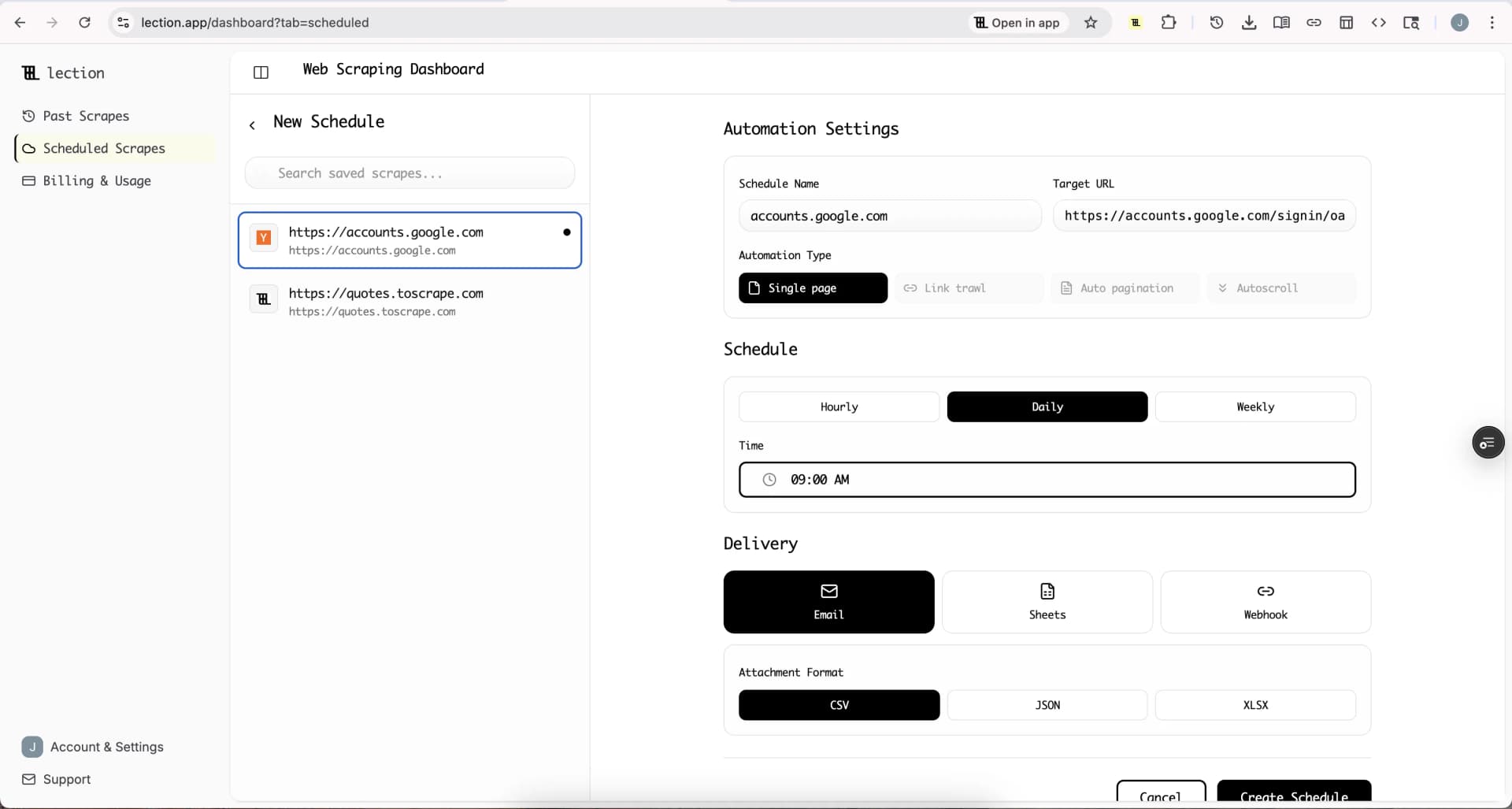
For ongoing monitoring, convert this to a Cloud Scrape that runs on your schedule.
Option 3: Integration Platforms
Connect your price extraction to automation platforms for sophisticated workflows:
Zapier/Make workflow example:
- Lection extracts competitor prices daily at 6 AM
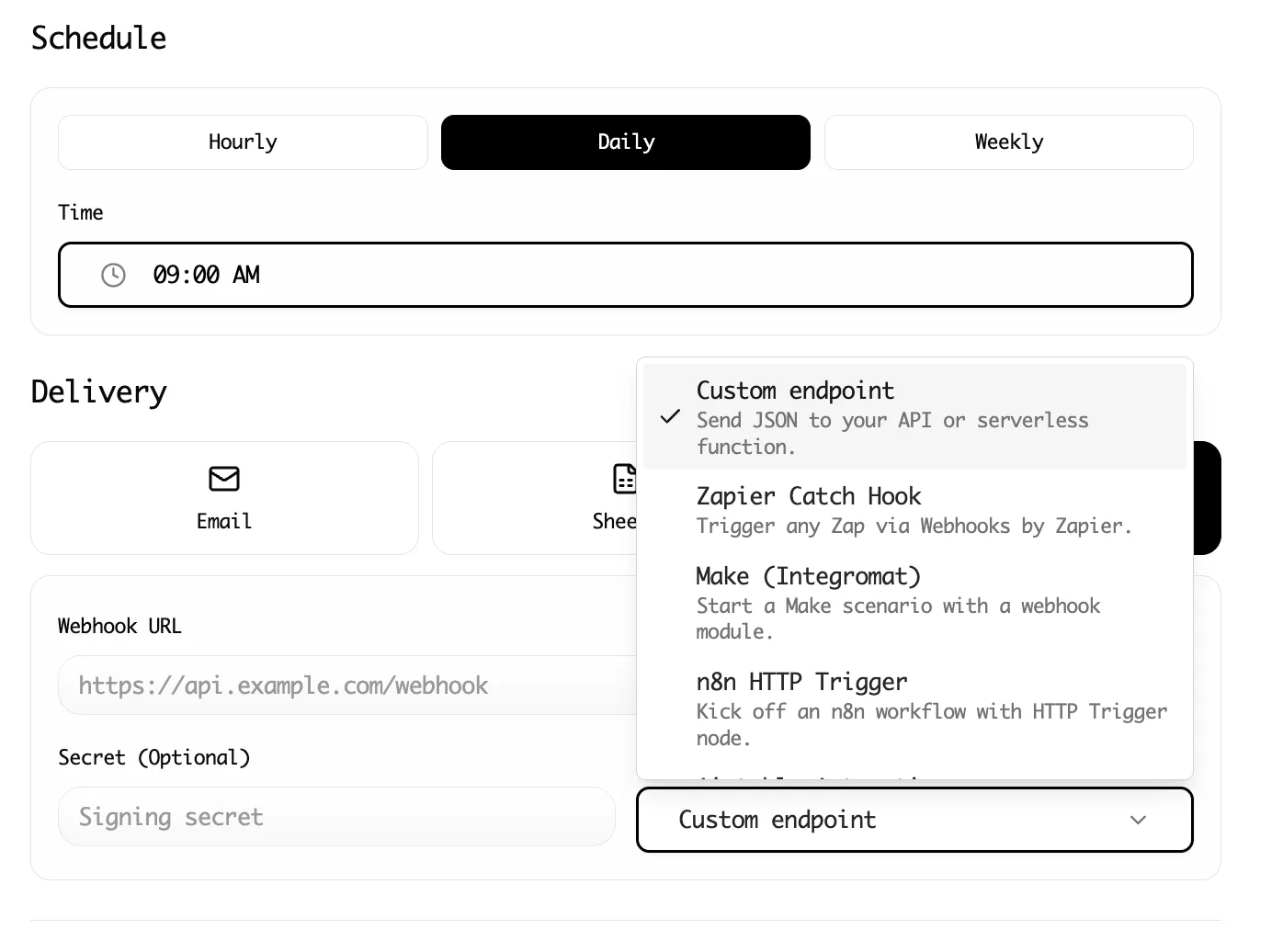
- Webhook sends data to Zapier
- Zapier compares new prices to yesterday's data
- If any price dropped more than 5%, send Slack alert
- Update Google Sheet with new prices and timestamp
- Create Notion task if review needed
This level of automation transforms price monitoring from a weekly task into a background process that only demands attention when something meaningful changes.
Setting Up Automated Price Alerts
The real value is not in collecting data. It is in acting on it quickly. Set up alerts so competitive changes reach you immediately.
Google Sheets Native Alerts
Google Sheets can send email notifications when values change:
- Go to Tools > Notification rules
- Set "A user submits a form" or "Any changes are made"
- Choose notification frequency
This is basic but works for small-scale monitoring.
Custom Apps Script Alerts
For smarter notifications, use Google Apps Script:
function checkPriceAlerts() {
  const sheet = SpreadsheetApp.getActiveSpreadsheet().getSheetByName('Prices');
  const data = sheet.getDataRange().getValues();
  const alertThreshold = 0.05; // 5% price difference

  let alerts = [];

  for (let i = 1; i < data.length; i++) {
    const ourPrice = data[i][2]; // Column C
    const comp1Price = data[i][4]; // Column E

    if (comp1Price && ourPrice) {
      const diff = (ourPrice - comp1Price) / ourPrice;
      if (diff > alertThreshold) {
        alerts.push(`${data[i][1]} is ${(diff*100).toFixed(1)}% higher than Competitor 1`);
      }
    }
  }

  if (alerts.length > 0) {
    MailApp.sendEmail('your@email.com', 'Price Alert', alerts.join('\n'));
  }
}
Set this to run daily via Triggers > Add trigger.
Slack Integration for Real-Time Alerts
For teams, Slack alerts are more actionable than email:
- Use Lection's webhook integration or a Zapier connection
- Configure conditional logic: only alert when price differences exceed your threshold
- Send to a dedicated #competitive-intel channel
Now your entire team sees competitive changes the moment they happen.
Handling Common Challenges
Challenge 1: Product Matching
Competitors do not use your SKU numbers. Matching "their Product X" to "your Product Y" requires manual mapping initially.
Solution: Create a reference table linking your SKUs to competitor product URLs. Maintain this manually but update it infrequently (only when products are added/removed).
| Your SKU | Your Name | Competitor 1 URL | Competitor 2 URL |
|---|---|---|---|
| ABC-001 | Widget Pro | competitor1.com/widget-p | competitor2.com/prod/12345 |
Challenge 2: Out-of-Stock Products
Competitors sometimes show "Out of Stock" instead of a price. Your tracker should handle this gracefully.
Solution: Extract both price and stock status. When stock status is unavailable, record the last known price with a flag. This prevents gaps in your historical data.
Challenge 3: Price Variations (Size/Color)
Many products have different prices for different variants.
Solution: Decide whether to track the base price (lowest variant) or specific variants that match your product. Document your methodology so comparisons are consistent.
Challenge 4: Geographic Pricing
Some sites show different prices based on location.
Solution: Lection runs in your browser, so it sees prices for your configured location. For international monitoring, you may need VPN tools or separate extraction jobs configured for each region.
Challenge 5: Competitor Site Blocking
Heavily trafficked e-commerce sites may rate-limit or block automated access.
Solution:
- Use reasonable delays between requests (Lection handles this automatically)
- Extract during off-peak hours
- For critical monitoring, browser-based tools face fewer blocks than server-side scrapers because they behave like real users
Practical Example: Building a Price Dashboard
Let us walk through a complete example. Say you sell consumer electronics and want to track four key products across three competitors.
Initial Setup
Create your Google Sheet with the structure from Step 1. Add your products:
| SKU | Product Name | Your Price | Best Buy | Best Buy URL | Amazon | Amazon URL | Walmart | Walmart URL |
|---|---|---|---|---|---|---|---|---|
| TV-55 | 55" 4K TV | $449.99 | amazon.com/... | bestbuy.com/... | walmart.com/... | |||
| LP-01 | Laptop Pro | $799.99 | ||||||
| HP-50 | Wireless Headphones | $149.99 | ||||||
| SW-10 | Smart Watch | $299.99 |
First Data Collection
Using Lection:
- Navigate to the first competitor URL
- Open Lection and select the price on the page
- The AI extracts the price value
- Export to your Google Sheet, targeting the appropriate column
- Repeat for each competitor
For four products across three competitors, this takes about 15 minutes the first time.
Schedule Recurring Updates
Once your extraction is working:
- Convert each working extraction to a Cloud Scrape
- Set a schedule (daily, every 6 hours, etc. depending on your market)
- Configure Google Sheets as the export destination
Now your spreadsheet updates automatically without manual intervention.
Add Historical Tracking
Create a second sheet called "Price History" that logs every price capture:
| Date | SKU | Competitor | Price |
|---|---|---|---|
| 2026-01-08 | TV-55 | Amazon | $429.99 |
| 2026-01-08 | TV-55 | Best Buy | $449.99 |
| 2026-01-09 | TV-55 | Amazon | $419.99 |
Use this for trend analysis: when does each competitor typically run promotions? Do they follow your price changes within a predictable window?
Advanced: Competitive Intelligence Beyond Price
Once your price tracking is running smoothly, expand your competitive monitoring:
Stock Availability
Track when competitors go out of stock. This signals demand spikes you can capitalize on.
Promotions and Coupons
Monitor competitor pricing pages, outlet sections, and coupon code fields. Some sites display active promotions on product pages.
Shipping and Fulfillment
Free shipping thresholds and delivery speeds affect total customer cost. A competitor at $449 with free shipping beats you at $439 with $15 shipping.
Review Sentiment
Track star ratings and review counts. A competitor's rating drop might signal quality issues they are struggling with.
Lection can extract all of these data points alongside price, giving you a complete competitive picture.
Common Mistakes to Avoid
Tracking Too Many Products
Start with your top 20 products by revenue or strategic importance. Comprehensive tracking sounds appealing but creates noise that obscures actionable signals.
Reacting to Every Price Change
Not every competitor price drop requires a response. Some are clearance for old inventory. Others are loss leaders. Understand their strategy before mirroring their moves.
Ignoring Data Quality
Garbage in, garbage out. Verify that your extraction is capturing the correct prices (not strikethrough prices, not "as low as" prices, not bundled prices). Spot-check regularly.
Forgetting Time Zones
Daily captures at different times can show phantom "changes" when competitor prices fluctuate during the day. Standardize your capture times.
Neglecting Legal Considerations
Web scraping operates in legal gray areas. Review competitors' robots.txt files and Terms of Service. For pricing intelligence specifically, courts have generally permitted collection of publicly visible prices, but this is jurisdiction-dependent. Consult legal counsel if you are building mission-critical systems.
The Business Impact: Real Numbers
When automated price tracking is implemented properly, the results compound:
Response time improvement: Teams typically go from 5-7 day awareness lag to same-day response. In fast-moving markets, this alone captures significant revenue.
Labor cost savings: A 4-hour weekly manual process becomes a 15-minute setup and occasional maintenance. That is roughly 200 hours per year returned to higher-value work.
Pricing accuracy: Eliminating the 12% manual error rate means pricing decisions are based on reality, not transcription mistakes.
Competitive win rate: Teams with real-time competitive intelligence report 15-25% improvement in head-to-head conversion rates.
Getting Started Today
Competitor price tracking does not require a massive project. Start simple:
- Today: Create your Google Sheet with proper structure for 10-20 key products
- This week: Install Lection and run your first extraction
- Next week: Convert successful extractions to scheduled Cloud Scrapes
- This month: Add alerting for significant price changes
Each step builds on the last. Within a month, you have automated infrastructure handling what used to consume hours of manual work.
The price of not tracking is invisible but real. Every day without competitive intelligence is a day making pricing decisions in the dark. Start gathering data today, and the strategic clarity follows.
Related Reading
- Vibe Coding Glossary: 30+ AI Terms
- Build a Price Comparison App with AI
- IMPORTXML vs IMPORTHTML vs Dedicated Scrapers
- Build a Price Monitoring Dashboard Without Code
- Data Validation Checklist for Scraped Data
- When IMPORTXML Breaks (And What To Do Instead)
- How to Get Amazon Product Data into Google Sheets (No Code)
- Connect Web Scraping to Zapier: A Beginner's Guide
- How to Schedule Recurring Web Scrapes (2026)
- Explore all tutorials and guides