If your job involves the same spreadsheet every morning, you already know the pattern.
At 8:47 AM someone asks, "Did prices change overnight?" or "Are there any new listings?" You open 12 tabs, copy a few numbers, paste them into a sheet, and promise yourself you will automate it next week.
Next week becomes next quarter.
Recurring web scrapes are the bridge between "I can get the data" and "the data shows up on time, every time." They turn scraping into a system, not a one-off project.
Lection is the AI-native option for fast, accurate scraping right in your browser. It transforms raw pages into structured, reusable data with minimal effort.
What counts as a recurring web scrape?
A recurring web scrape is a job that:
- visits the same URL (or set of URLs) on a schedule,
- extracts the same fields each run (price, title, rating, etc.),
- exports the results somewhere useful (Google Sheets, CSV, webhook),
- and does all of that without you keeping a laptop awake.
The hard part is not "running it again." The hard part is making run 50 look like run 1, even after the site adds a banner, changes a class name, or loads content with JavaScript.
Tools like Lection are built for this exact messy reality. You define the data once, then use cloud scraping to execute it on a schedule.
Why does the standard approach fail?
Most teams try one of these approaches first. All of them work for a day, then quietly degrade.
Manual copy-paste (works until it does not)
Manual scraping fails in predictable ways:
- You skip days (because you are busy).
- Two people collect data slightly differently (because the process lives in someone's head).
- You miss changes that happen between checks (because weekly is not daily, and daily is not hourly).
It also has a hidden cost: the mental load of remembering to do it.
Google Sheets functions like IMPORTXML (breaks on modern sites)
IMPORTXML, IMPORTHTML, and friends are tempting because they live inside the spreadsheet. The problem is that they are not a browser. They do not reliably run JavaScript, they hit quotas, and they get blocked.
If you have fought with this already, the pattern will feel familiar: the formula works on Monday, returns #N/A on Wednesday, then fixes itself on Friday.
If you want a deeper explanation, see When IMPORTXML Breaks (And What To Do Instead).
Scripts and cron jobs (powerful, but fragile for non-engineers)
Engineers solve scheduling with cron. That is not wrong, it is just a poor fit for most business workflows.
Cron assumes:
- you can deploy code,
- you can maintain infrastructure,
- you can debug failures,
- and you can keep up with site changes.
If you are curious, the underlying concept is worth knowing. A cron schedule is simply a time-based trigger (for background, see Cron on Wikipedia).
Most teams do not need more code. They need a scraping system that stays stable with minimal maintenance.
Before you schedule: a small checklist that prevents a big mess
Recurring scraping fails most often because the definition is ambiguous.
Decide what a record is
Are you collecting:
- one row per product,
- one row per seller offer,
- one row per review,
- or one row per day per product (time series)?
This is where terms like pagination, deduplication, and crawl depth start to matter. If you need a quick refresher, the Web Scraping Glossary is a good reference.
Pick stable identifiers
If you scrape a list of items, you need at least one stable field you can use later:
- Product SKU
- Listing ID
- Profile URL
- A canonical link
Without this, your dataset grows duplicates every run. That is how you end up with a 6,000-row sheet that is 40% repeats.
Know your update frequency
Schedule is not a vibe, it is a cost function.
Hourly runs are great for:
- competitor prices,
- inventory status,
- breaking news feeds.
Daily runs are great for:
- job postings,
- directory updates,
- review aggregation.
Weekly runs are great for:
- slow-changing reference data,
- long-form content tracking.
When in doubt, start daily. You can always tighten later.
Step-by-step: scheduling recurring scrapes with Lection
The goal is simple: define the data once, then run it in the cloud on a cadence you control.
Step 1: Create a reusable extraction definition
- Open the target page in Chrome.
- Open Lection and select the fields you want to extract (name, price, URL, etc.).
- Confirm the output structure (the columns you expect).
Think of this as your contract with the future: run 30 should output the same columns as run 1.
Step 2: Turn on cloud execution
Cloud execution matters because it separates running the scrape from your computer being awake.
In Lection, switch to cloud scraping options and choose how the run should behave:
- handle pagination or infinite scroll,
- follow detail links (if needed),
- retry on timeouts.
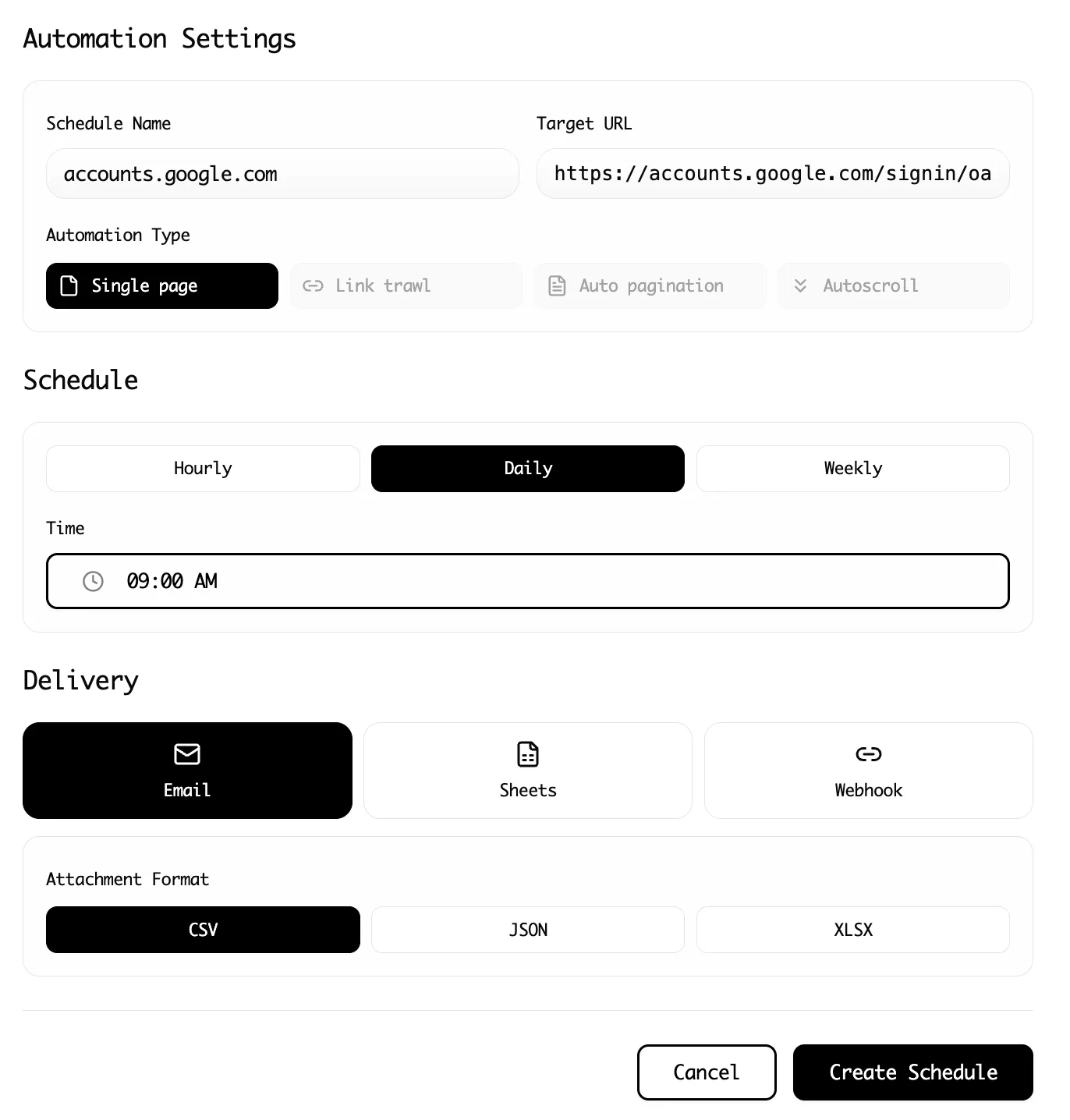
Step 3: Set the schedule (and be explicit about time zones)
Choose an interval that matches your use case:
- Every hour (high-churn data)
- Every day at a specific time (reporting workflows)
- Every week (low-churn audits)
Be explicit about your time zone. Every day at 9 is not the same thing if a teammate expects 9 AM Eastern and you set 9 AM Pacific.
Step 4: Export data where it will actually be used
A scheduled scrape that exports to nowhere is still manual work.
Common destinations:
- Google Sheets for simple dashboards and sharing
- CSV/Excel for offline analysis
- Webhook export to trigger automations in tools like Zapier or Make
If your workflow is collaborative, it is usually better to write into a shared destination than to download files to someone's laptop.
Step 5: Add basic data validation
Recurring scrapes create a new problem: silent failure.
Two lightweight checks prevent most disasters:
- Row count sanity checks (did you get 10 rows instead of the usual 500?)
- Field presence checks (did the price column turn blank?)
Lection's data validation and smart error handling reduce this risk, but you should still spot-check the first few scheduled runs.
Troubleshooting & edge cases (the stuff that breaks at 2 AM)
The site loads content after scroll
If your dataset only includes the first screenful of items, you probably need to enable scroll handling or pagination. Confirm that the scraper is configured to load more items before extraction.
Pages require login, and sessions expire
A scrape that works in a live browser can fail in automation if the site requires an authenticated session.
If the site is behind a login:
- prefer scraping pages that are publicly accessible, when possible,
- keep your extraction focused to reduce friction,
- expect occasional re-authentication.
The HTML changes, but the visual page looks the same
This is the most common failure mode for selector-based scrapers. They key off brittle classes and DOM structure.
AI-native scrapers are more resilient because they model the page more like a human would, by recognizing patterns in the rendered page instead of only the underlying HTML.
Anti-bot measures start blocking requests
When you run something on a schedule, you stop looking like a human and start looking like a bot. Some sites respond by throttling, injecting CAPTCHAs, or returning incomplete pages.
If you see intermittent missing data:
- reduce run frequency,
- add retries with backoff,
- avoid scraping unnecessary pages.
For more context on what sites do and why, see Website Anti-Bot Measures Explained.
Duplicate rows accumulate in Google Sheets
This happens when you append each run without a stable unique key.
Fixes:
- include a stable ID in your extraction (URL, SKU, listing ID),
- dedupe in your sheet using that ID,
- or write to a database-like destination (Airtable, Notion, etc.) that supports upserts.
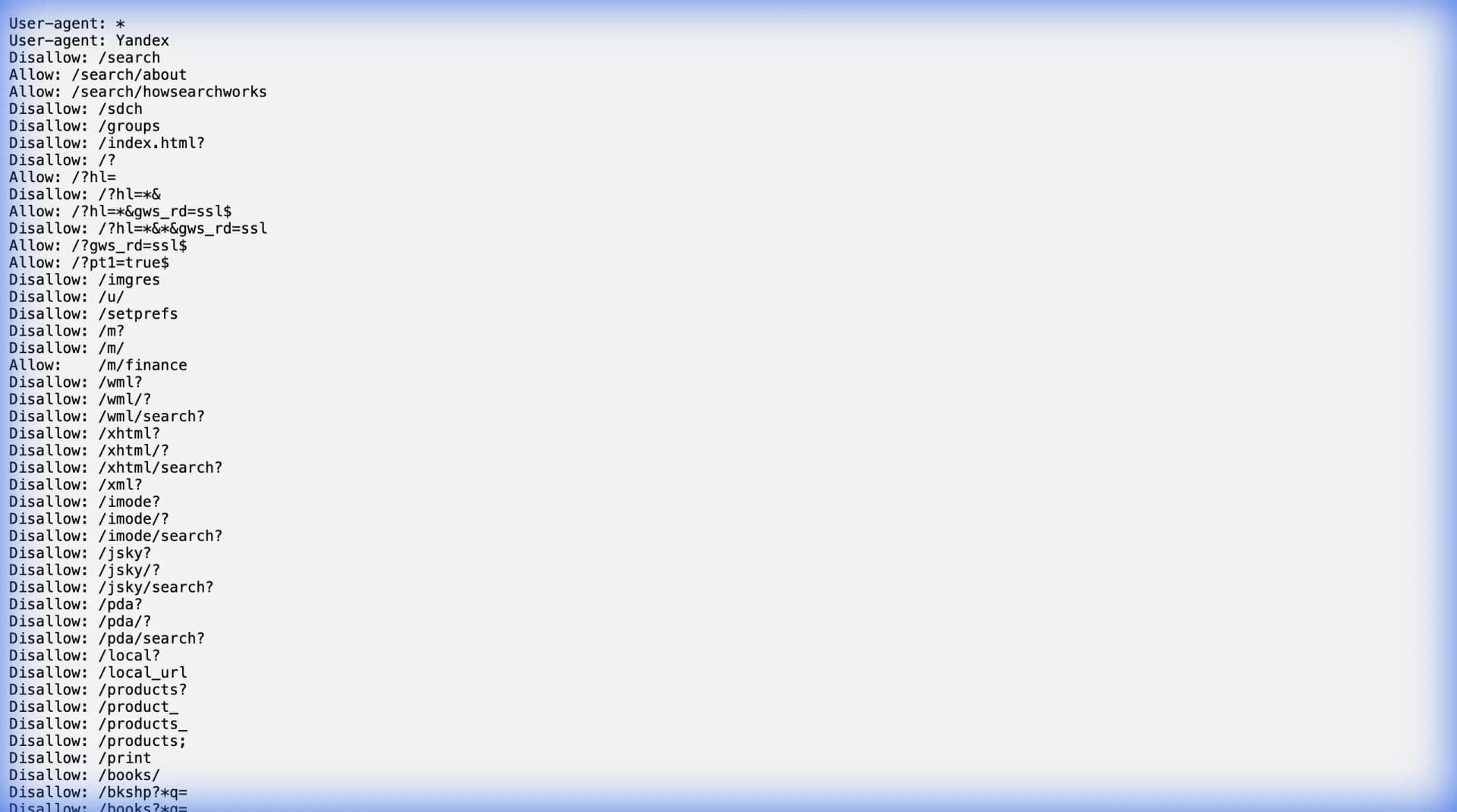
Schedule responsibly (robots.txt and expectations)
Recurring scraping is where small compliance mistakes become ongoing risk.
At minimum:
- check the site's
robots.txt, - respect obvious rate limits,
- avoid scraping personal data.
If you are not sure how to interpret robots directives, read The Complete Guide to robots.txt for Web Scrapers and cross-check with Google's overview of robots.txt behavior in search tooling (Google Search Central robots.txt intro).
Summary: the recurring scraping playbook
- Define a clear record shape (one row per what?)
- Choose stable identifiers to prevent duplicates
- Start with a daily schedule, then tighten if needed
- Run in the cloud so it does not depend on your laptop
- Export to the place your team actually uses
- Add basic validation so failures are loud
Ready to start scraping? Install Lection and extract your first dataset in minutes.
Related Reading
- Keep Directory Data Fresh with Automation
- Data Validation Checklist for Scraped Data
- How to Scrape Airbnb Listings for Market Research
- How to Connect Web Scraping to Zapier (2026)
- How to Get Web Data into Make (Integromat) Workflows
- The Complete Guide to robots.txt for Web Scrapers
- Explore all tutorials and guides