If you have ever tried to extract data from a website, you have probably encountered the term "robots.txt." This small text file, sitting quietly at the root of every major website, acts as a communication channel between site owners and web crawlers. Understanding it is foundational to ethical, sustainable web scraping.
Yet for many people getting started with data extraction, robots.txt remains mysterious. What do those cryptic directives actually mean? Is ignoring them illegal? How do modern AI crawlers fit into the picture?
This guide breaks down everything you need to know about robots.txt from a web scraper's perspective. Whether you are building automated data pipelines, conducting market research, or just trying to understand best practices, this comprehensive reference will help you navigate the rules that govern web crawling in 2025.
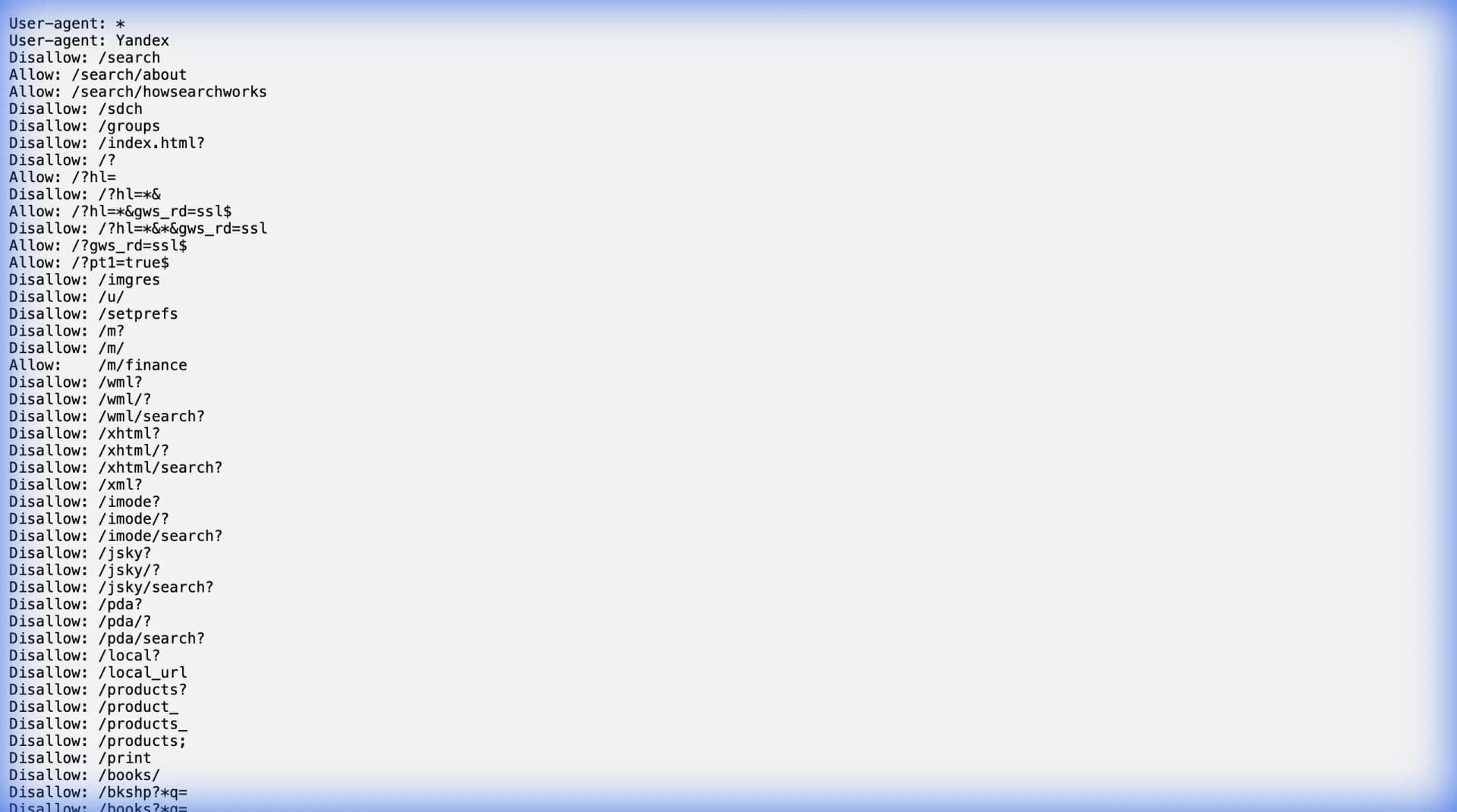
What is robots.txt?
The robots.txt file is part of the Robots Exclusion Protocol (REP), a standard created in 1994 to help website owners communicate their crawling preferences to automated bots. It is a plain text file located at the root of a website's domain.
To find any website's robots.txt file, simply append /robots.txt to the site's root URL. For example:
https://google.com/robots.txthttps://amazon.com/robots.txthttps://linkedin.com/robots.txt
If you receive a 404 error, the website does not have a robots.txt file, which typically means no explicit crawling restrictions are in place. However, this does not mean you should scrape without consideration—responsible practices still apply.
What robots.txt Is NOT
Before diving into the syntax, let us clear up common misconceptions:
It is not a security measure. The robots.txt file is a request, not a command. It tells crawlers "please don't access this," but does not technically prevent anything. A malicious bot can ignore it entirely. If a website truly needs to protect content, they use authentication, paywalls, or server-side access controls.
It is not legally binding on its own. While disregarding robots.txt can factor into legal disputes (especially when combined with Terms of Service violations), the file itself is not a contract. Courts look at the totality of circumstances, not just robots.txt compliance.
It is not universal. Different crawlers interpret directives differently. Googlebot might handle certain syntax that other crawlers ignore. Always test your assumptions.
The Anatomy of a robots.txt File
A robots.txt file consists of one or more rule sets, each targeting specific crawlers (User-agents) with specific instructions (Allow, Disallow, Crawl-delay, etc.).
Here is a typical example:
User-agent: *
Disallow: /admin/
Disallow: /private/
Crawl-delay: 10

User-agent: Googlebot
Allow: /
Disallow: /search

Sitemap: https://example.com/sitemap.xml
Let us break down each directive.
User-agent
The User-agent line specifies which crawler the following rules apply to. A User-agent is the identifier string that a bot sends to a server to identify itself.
| User-agent | Bot |
|---|---|
* | Wildcard: applies to all crawlers |
Googlebot | Google's main search crawler |
Bingbot | Microsoft Bing's crawler |
GPTBot | OpenAI's crawler for training models |
CCBot | Common Crawl's data collection bot |
anthropic-ai | Anthropic's AI training crawler |
ClaudeBot | Anthropic's Claude-related crawler |
Applebot | Apple's web crawler for Siri and Spotlight |
facebookexternalhit | Facebook's link preview crawler |
Twitterbot | Twitter/X's link preview crawler |
When a crawler visits a site, it checks the robots.txt for its specific User-agent first. If a match exists, those rules take precedence. If not, it falls back to the wildcard (*) rules.
Practical example: If you build a custom scraper, it likely does not have a named entry in most robots.txt files. Your scraper would follow the User-agent: * rules by default.
Disallow
The Disallow directive tells crawlers not to access specific paths or directories.
User-agent: *
Disallow: /admin/
Disallow: /api/
Disallow: /checkout/
Disallow: /user/profile/
Key syntax rules:
Disallow: /blocks the entire siteDisallow: /directory/blocks everything under that directoryDisallow: /page.htmlblocks that specific pageDisallow:(empty value) means nothing is disallowed
Pattern matching: Most modern crawlers support wildcards:
Disallow: /private/*blocks all content under /private/Disallow: /*.pdf$blocks all PDF filesDisallow: /search?*sort=blocks URLs with specific parameters
Allow
The Allow directive creates exceptions within Disallow rules. It permits access to specific paths that would otherwise be blocked.
User-agent: *
Disallow: /private/
Allow: /private/public-readme.html
In this example, all content under /private/ is blocked, except for public-readme.html.
The order matters less than specificity. More specific rules (longer paths) take precedence over less specific ones. But when paths are equally specific, Allow typically takes precedence over Disallow.
Crawl-delay
The Crawl-delay directive specifies how many seconds a crawler should wait between requests. This helps protect servers from being overwhelmed.
User-agent: *
Crawl-delay: 10
This tells crawlers to wait 10 seconds between each page request.
Important caveat: Googlebot does not respect the Crawl-delay directive. Google expects webmasters to manage crawl rates through Google Search Console instead. However, many other crawlers (Bingbot, Yandex, and custom scrapers) do respect it.
For ethical web scraping, even if a site does not specify a Crawl-delay, implementing your own delay (1-5 seconds minimum) is considered best practice.
Sitemap
The Sitemap directive points to the location of the site's XML sitemap, which lists all publicly accessible URLs.
Sitemap: https://example.com/sitemap.xml
Sitemap: https://example.com/blog-sitemap.xml
For web scrapers, sitemaps are invaluable. Instead of guessing what pages exist or relying on link discovery, you can parse the sitemap for a structured list of URLs. This is often faster and more complete than crawling.
Lection can leverage sitemap information to build more efficient extraction workflows, ensuring you capture all relevant pages without missing hidden content.
Request-rate
Some robots.txt files include the Request-rate directive, which is more specific than Crawl-delay:
Request-rate: 5/60
This means 5 requests per 60 seconds minimum. It is less commonly used but appears on some high-traffic sites.
Visit-time
Rarely seen, the Visit-time directive restricts crawling to specific hours:
Visit-time: 0200-0600
This requests crawlers only access the site between 2 AM and 6 AM. Support for this directive is inconsistent across crawlers.
Real-World Examples: How Major Sites Use robots.txt
Understanding theory is useful, but seeing how major platforms structure their robots.txt files provides practical insight.
Google (google.com/robots.txt)
Google's robots.txt is extensive, listing dozens of specific disallowed paths for different crawlers. It blocks internal tools, search result pages, and administrative sections while allowing main content.
Notable patterns:
- Blocks
/searchpaths (you cannot crawl their search results) - Allows Googlebot access to most public content
- Specifies sitemaps for main site and news content
Amazon (amazon.com/robots.txt)
Amazon blocks numerous paths related to cart management, checkout, wishlists, and internal APIs. Product pages are generally accessible, which is why e-commerce data extraction is possible.
Key takeaway: Amazon's robots.txt allows you to access product listings but blocks user-specific and transactional pages. Tools like Lection that focus on visible product data work within these boundaries.
LinkedIn (linkedin.com/robots.txt)
LinkedIn has one of the most restrictive robots.txt files among major platforms. They block almost everything for generic crawlers:
User-agent: *
Disallow: /
However, they allow access for specific crawlers like Googlebot and Bingbot to index public profiles for search.
This restrictiveness is part of why LinkedIn data extraction requires browser-based approaches that work with your authenticated session, rather than traditional server-side scraping.
AI Crawlers: The New Frontier
2024 and 2025 brought a wave of new crawlers designed to gather training data for large language models. Site owners are updating their robots.txt files to address these specifically.
Common AI Crawler User-agents
| User-agent | Company | Purpose |
|---|---|---|
GPTBot | OpenAI | Training data for GPT models |
ChatGPT-User | OpenAI | ChatGPT browsing feature |
CCBot | Common Crawl | Nonprofit data archive |
anthropic-ai | Anthropic | Claude training data |
ClaudeBot | Anthropic | Claude-related crawling |
Google-Extended | Gemini/Bard training data | |
Bytespider | TikTok/ByteDance | AI training data |
cohere-ai | Cohere | AI training data |
Many publishers now include explicit blocks for these crawlers:
User-agent: GPTBot
Disallow: /

User-agent: CCBot
Disallow: /

User-agent: anthropic-ai
Disallow: /
If you are building a web scraper for business purposes (not AI training), this is good news. Sites are becoming more explicit about what they block and why, making it easier to understand their preferences.
What This Means for Scrapers
The distinction between "data for AI training" and "data for business analysis" is becoming clearer in robots.txt conventions. Sites that block GPTBot may still allow general crawlers because they differentiate between:
- AI training (using content to build models that compete with the original)
- Indexing (helping users find the content)
- Research/analysis (extracting structured data for business purposes)
This is where browser-based, user-session-driven tools like Lection maintain an advantage. Operating within your authenticated browser session, extracting data you can already see, is fundamentally different from mass crawling for model training.
Ethical and Legal Considerations
Robots.txt in Court Cases
Several landmark cases have referenced robots.txt compliance:
hiQ Labs v. LinkedIn (2022): The Ninth Circuit ruled that scraping publicly accessible data does not violate the CFAA (Computer Fraud and Abuse Act), even when the company sends cease-and-desist letters. However, the court noted that this applies to genuinely public data, not authenticated or restricted content.
Ryanair v. Opodo (EU, 2015): European courts upheld that ignoring robots.txt can factor into unfair competition claims, especially when combined with aggressive commercial scraping.
The takeaway: robots.txt compliance alone does not make scraping legal or illegal, but it is one factor courts consider. Following robots.txt demonstrates good faith.
Building a Compliance Framework
For ethical, sustainable web scraping, consider this checklist:
Before scraping:
- Check robots.txt for your target site
- Review the site's Terms of Service
- Assess whether the data is genuinely public
- Plan appropriate request delays
During scraping:
- Respect Disallow directives
- Implement delays between requests (minimum 1-2 seconds)
- Use descriptive User-agent strings when appropriate
- Monitor for rate limiting or blocking signals
After scraping:
- Store data securely
- Use data only for stated purposes
- Consider data freshness and periodic re-extraction needs
- Document your compliance decisions
How to Parse robots.txt Programmatically
If you are building custom scraping tools, parsing robots.txt accurately matters.
Python Example
import urllib.robotparser

rp = urllib.robotparser.RobotFileParser()
rp.set_url("https://example.com/robots.txt")
rp.read()

# Check if a URL is allowed
can_fetch = rp.can_fetch("*", "/products/item-123")
print(f"Can fetch: {can_fetch}")

# Get crawl delay
crawl_delay = rp.crawl_delay("*")
print(f"Crawl delay: {crawl_delay}")
JavaScript Example
const robotsParser = require('robots-txt-parser');
const parser = robotsParser({
  userAgent: 'MyBot',
  allowOnNeutral: true
});

await parser.useRobotsFor('https://example.com');
const isAllowed = parser.canCrawl('/products/item-123');
console.log('Can crawl:', isAllowed);
Using No-Code Tools
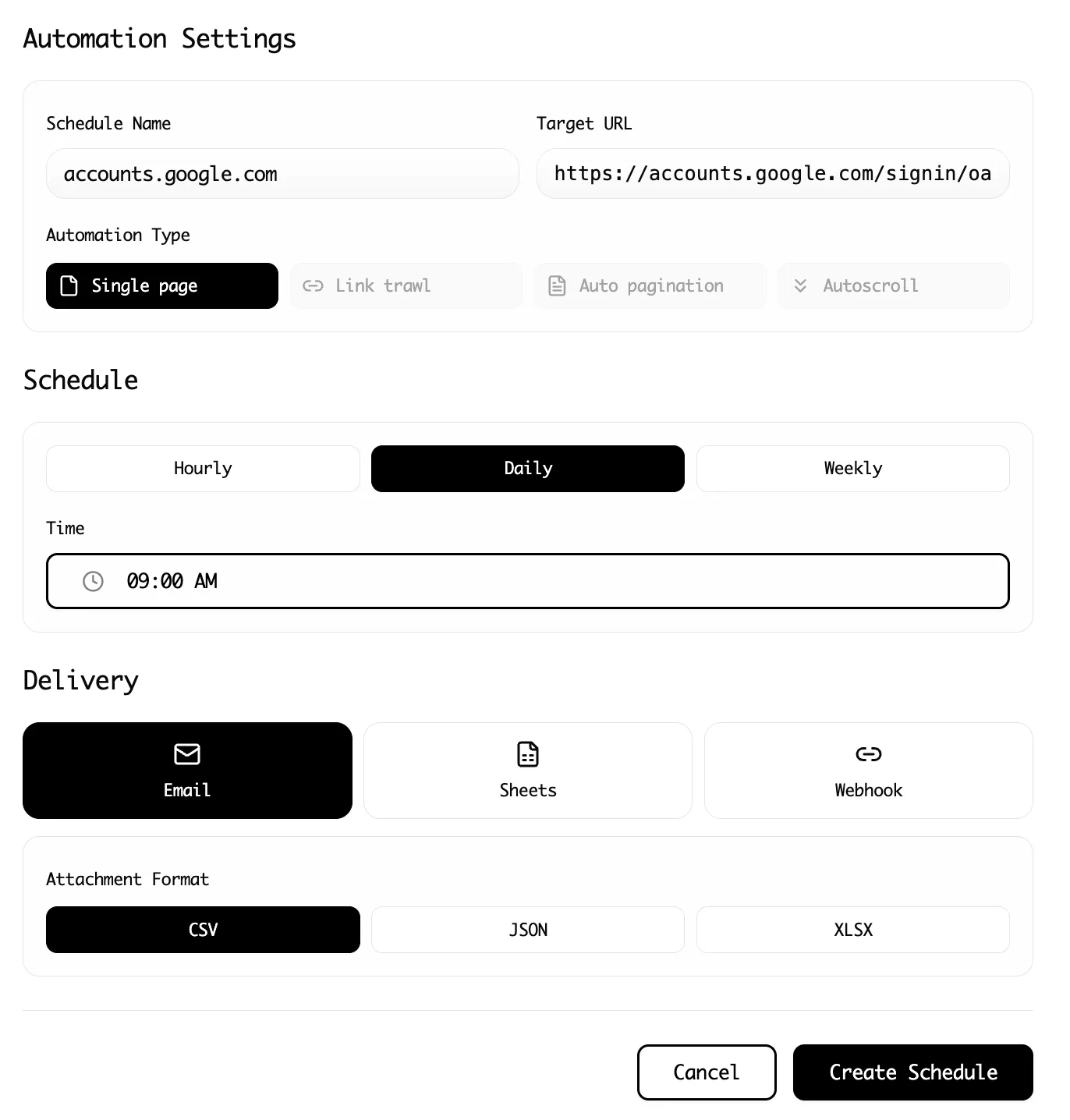
If you are using no-code scraping tools like Lection, you do not need to parse robots.txt manually. Browser-based extractors work within your normal browsing session, accessing only content that is already visible to you as a user. This sidesteps many robots.txt concerns because you are not making automated server requests—you are extracting from an already-rendered page.
Common robots.txt Patterns and Their Meanings
Pattern 1: "Block everything for everyone"
User-agent: *
Disallow: /
The site does not want any crawlers. This is common for authenticated applications, internal tools, or sites with legal restrictions on content redistribution.
Pattern 2: "Block everything except search engines"
User-agent: *
Disallow: /

User-agent: Googlebot
Allow: /

User-agent: Bingbot
Allow: /
The site wants search engine indexing but blocks other crawlers. This is typical for content publishers who want organic traffic but not data extraction.
Pattern 3: "Block specific sections"
User-agent: *
Disallow: /admin/
Disallow: /checkout/
Disallow: /my-account/
The site allows most crawling but protects user-specific and administrative areas. E-commerce sites commonly use this pattern.
Pattern 4: "Rate-limited access"
User-agent: *
Crawl-delay: 30
Disallow: /api/
The site allows crawling but asks for slow, cautious access. Common for smaller sites with limited infrastructure.
Pattern 5: "Block AI trainers specifically"
User-agent: GPTBot
Disallow: /

User-agent: CCBot
Disallow: /

User-agent: *
Disallow: /private/
The site blocks AI training crawlers specifically while allowing general access. This pattern became common in 2024-2025.
Troubleshooting: When robots.txt Seems Confusing
Conflicting rules
If you see conflicting Allow and Disallow rules, remember that more specific paths take precedence. If still unclear, choose the more restrictive interpretation—it is safer.
No robots.txt file
A missing robots.txt file (404 response) technically means no restrictions, but practice ethical crawling anyway. Implement reasonable delays, respect implicit rate limits, and focus on publicly accessible content.
Robots.txt changes frequently
Some sites update their robots.txt regularly. If you are running scheduled scrapes, periodically re-check the file to ensure your policies are still compliant.
The site also blocks via other means
Even if robots.txt allows access, websites can block scrapers through:
- Rate limiting (returning 429 errors)
- CAPTCHA challenges
- JavaScript rendering requirements
- IP blocking
For resilient data extraction, tools like Lection that operate within your browser and mimic natural human behavior are more reliable than server-side HTTP scrapers that bypass normal rendering.
Best Practices Summary
-
Always check robots.txt first. It takes seconds and demonstrates good faith.
-
Implement crawl delays. Even if not specified, 1-5 seconds between requests is respectful.
-
Respect Disallow directives. They represent the site owner's stated preferences.
-
Use descriptive User-agent strings. If you are building custom tools, identify yourself so webmasters know who is accessing their site.
-
Combine with Terms of Service review. robots.txt is one signal; also review the site's legal policies.
-
Consider browser-based extraction. Tools like Lection that extract from already-rendered pages sidestep many automated crawling concerns.
-
Document your decisions. Keep records of why you made specific compliance choices, especially for business-critical data pipelines.
-
Monitor for changes. Websites update their robots.txt periodically. Build checking into your workflow.
Conclusion: robots.txt as a Communication Tool
The robots.txt file is not a locked door—it is more like a "please knock first" sign. It represents website owners' preferences communicated in a standardized format that the web scraping community has respected for 30 years.
Understanding robots.txt is foundational to ethical, sustainable data extraction. While it does not solve all legal and ethical questions around web scraping, respecting these signals demonstrates good faith and reduces friction with site owners.
For most business use cases—market research, competitive analysis, lead generation, price monitoring—working within robots.txt constraints is both possible and advisable. The sites that block scraping entirely often have alternative data sources (APIs, data partnerships) worth exploring.
Ready to extract data the right way? Install Lection and start building ethical, efficient data workflows today.