In a world of information overload, the most dangerous thing isn't missing data—it's missing the change in the data. A competitor slashing prices on a Friday afternoon. A regulatory agency posting a new compliance requirement. A potential lead opening a new hiring role.
If you're manually refreshing pages to catch these updates, you're fighting a losing battle. You're either wasting hours of deep work time on "check-ins," or you're checking too infrequently and missing the critical window to react.
Many teams try to solve this with "visual monitors" like Visualping, which take a screenshot and email you if a pixel changes. But pixels are noisy. A banner ad rotates? Alert. A holiday greeting added to the footer? Alert. Soon, your "monitoring" channel is so spammy you mute it, defeating the purpose entirely.
This guide shows you how to build a smart Slack alert system. One that ignores visual noise and notifies you only when the specific data you care about actually changes.
Why "Visual" Monitoring Fails at Scale
Traditional change detection tools are pixel-based. They look at a webpage like a camera does.
- The False Positive Problem: If a site changes its font size or updates a sidebar menu, visual tools scream "CHANGE DETECTED!" even if the content you care about (e.g., price) is identical.
- The Context Gap: A visual alert sends you a screenshot. You still have to squint and interpret what changed. It doesn't tell you "Price dropped by 10%," it just says "Something is different."
- No Automation: Visual alerts stop at the notification. You can't pipe a screenshot into a database or trigger a workflow.
The Solution: Data Monitoring. Instead of watching pixels, we monitor the structured data. We extract the specific text, numbers, or elements we care about, compare them to the last value, and trigger alerts based on logic.
The Architecture of a Smart Alert
We'll build a pipeline that runs 24/7 without you opening a browser:
- Lection Cloud Scrape: Extracts the specific data (not the whole page) on a schedule.
- Zapier / Make: Receives the data and applies logic (e.g., "Only alert if Price < $50").
- Slack: Dumps the specific notification into the right channel.
Step 1: Define What You're Tracking
Be specific. "Monitor the website" is a bad goal. "Monitor the pricing text on the Enterprise landing page" is a good goal.
Examples of high-value signals:
- Competitor Pricing: Alert #sales if Competitor X drops below $500.
- Hiring Trends: Alert #recruiting if a target company posts a "Senior Engineer" role.
- Regulatory News: Alert #legal if a government domain performs an update to a specific guidance document.
- Stock Availability: Alert #procurement if a key supplier switches from "Out of Stock" to "Available."
Step 2: Configure the Extraction with Lection
We need a tool that sees data, not just pixels.
- Navigate to the target URL in Chrome.
- Open Lection and click the element you want to track (e.g., the price $499).
- Lection creates a "definition" for this data point.
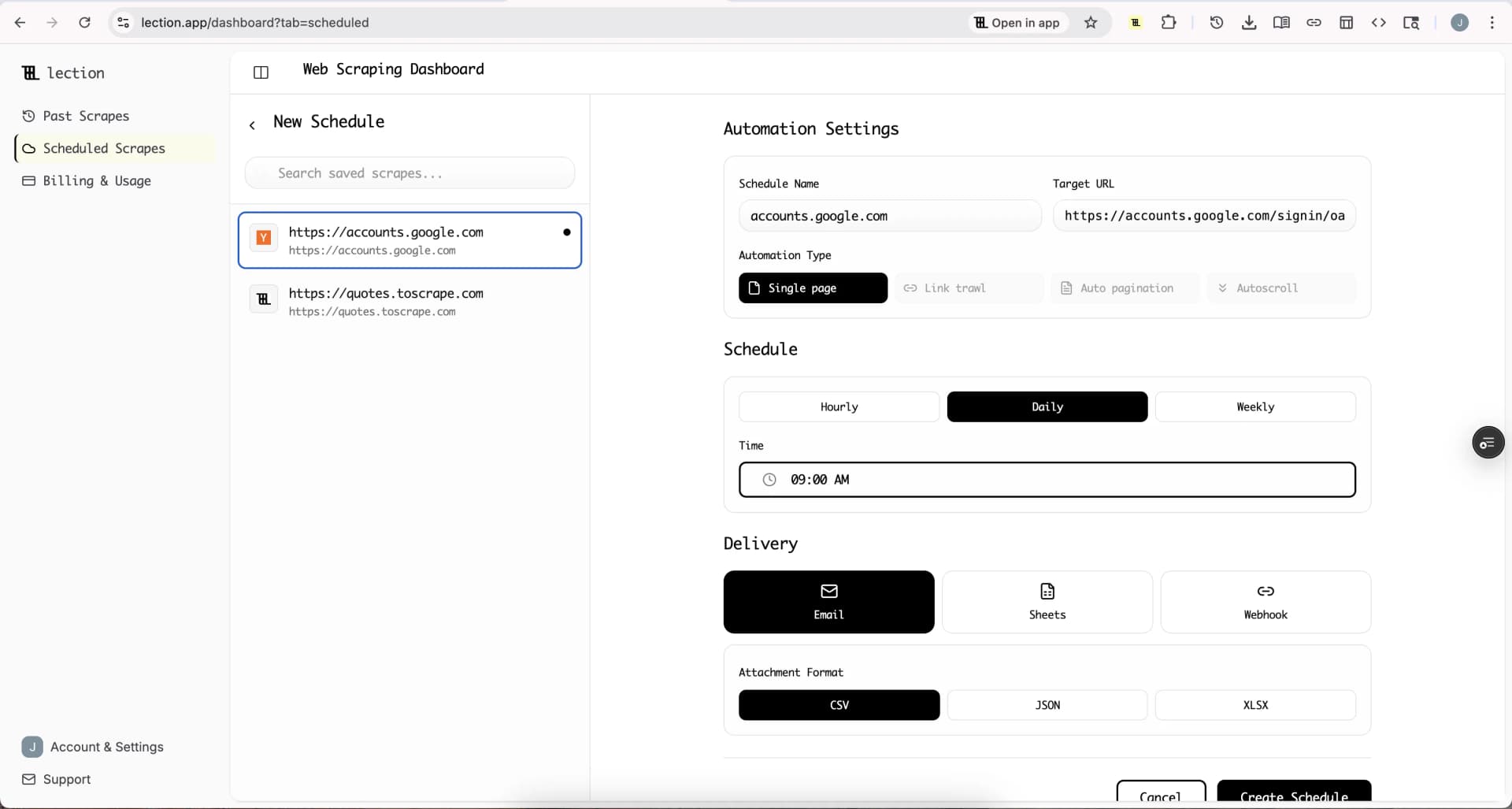
- Switch to the Cloud Scrape tab in Lection dashboard.
- Set your schedule (e.g., "Every 2 hours").
Now, Lection will visit that page 12 times a day and extract exactly that number. It ignores the banner ads, the popups, and the footer changes.
Step 3: Connect to Zapier (The "Brain")
We don't want an alert every time Lection runs. We only want an alert when something changes.
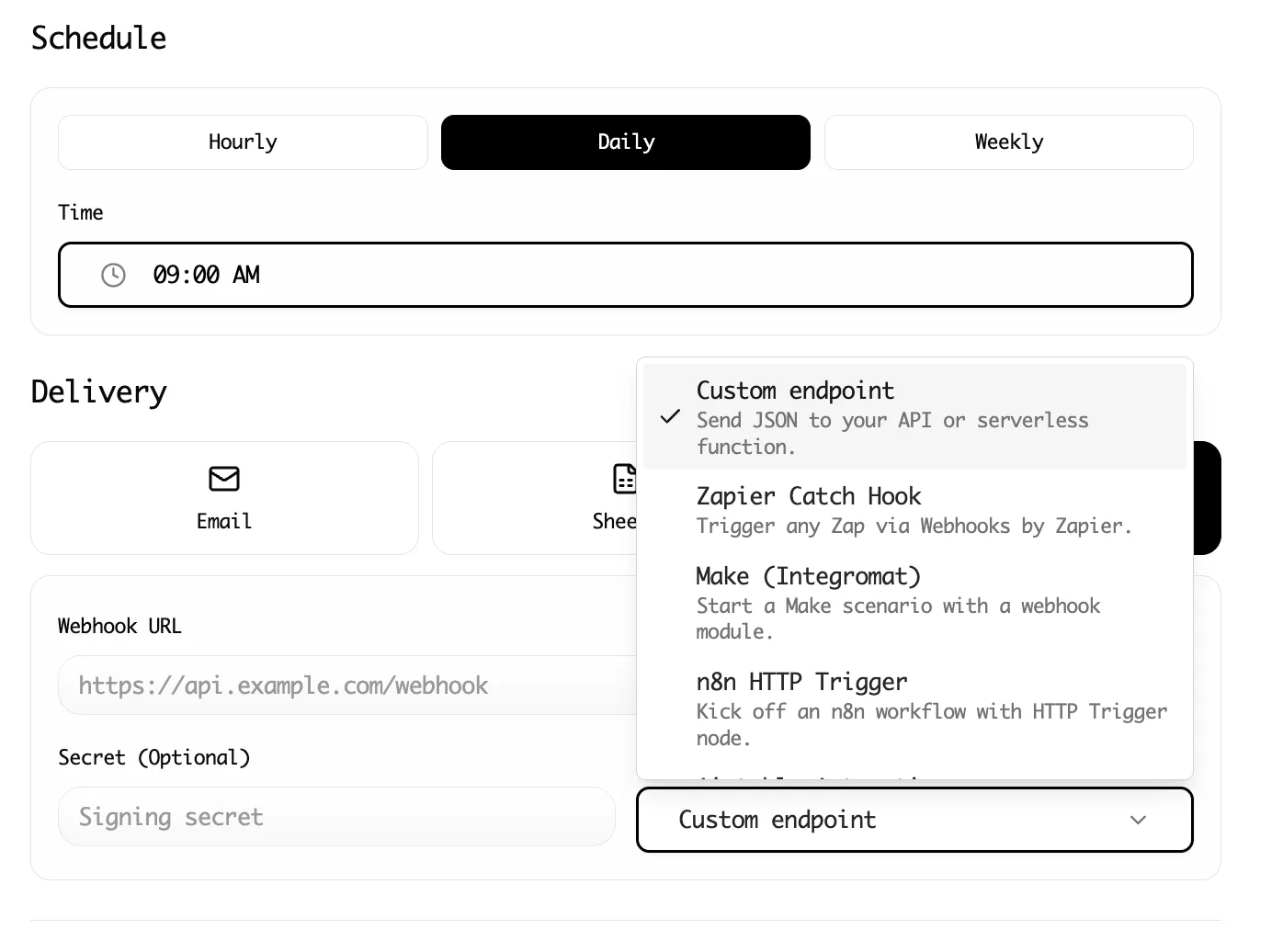
- In Lection, go to the Integrations tab for your scrape.
- Select Webhook.
- In Zapier, create a new Zap with "Webhooks by Zapier" as the trigger (Catch Hook).
- Copy the Zapier Webhook URL into Lection.
Now, every time Lection runs a scan, it sends the clean, structured data payload to Zapier.
Step 4: Filter the Noise (Logic)
This is where the magic happens. In Zapier, we add a Filter step.
- Logic: "Only continue if..."
- Condition: We need to compare specific values.
Pro Tip: For simple "change detection," you can use Zapier's "Storage" tool or visual logic. But Lection makes this easier. You can configure Lection to only send a webhook if the data is different from the previous run, or handle the deductive logic in a tool like Make.com which has a "Data store" module to save the previous state.
Example Logic for a Price Alert:
IF [New Price] < [Target Price] THEN [Send Alert]
Example Logic for Content Change:
IF [New Headline] DOES NOT MATCH [Old Headline] THEN [Send Alert]
Step 5: Format the Slack Notification
A good Slack alert answers three questions: What happened? Does it matter? What should I do?
Don't just dump raw JSON. Use Zapier's Slack formatting blocks to make it actionable.
Bad Alert:
New webhook received. Data: {"price": "399", "url": "..."}
Good Alert:
🚨 Competitor Price Drop Detected
Product: Enterprise CRM Tier Old Price: $499 New Price: $399 (20% Drop)
Advanced Strategy: The Daily Digest
Sometimes, real-time is too noisy. If you're monitoring 50 competitors, you don't want 50 Slack pings a day.
The "Digest" Workflow:
- Lection scrapes data every hour.
- Zapier sends data to Google Sheets (adds a row).
- Zapier (separate Zap) triggers every morning at 9:00 AM.
- Use "Find Many Rows" in Google Sheets to find changes from the last 24 hours.
- Send one consolidated Slack message: "Here are the 3 huge price changes from yesterday."
Integrating with Deep Deep Workflows
Once you have the data in Slack, you can trigger other things.
- Price change? Trigger a task in Asana to review pricing strategy.
- New negative review? Alert Customer Success and auto-draft a reply in a Google Doc.
- New regulatory doc? Upload the PDF to an AI summarizer and Slack the summary, not just the link.
Summary
Visual monitoring is for checking if a website is online. Data monitoring is for checking if a business is competing.
By decoupling the "extraction" (Lection) from the "notification" (Slack), you build a surveillance engine that works for you, instead of a noise machine that distracts you.
Ready to build your first silent sentry? Install Lection and set up your first cloud scrape today.