Directory websites are experiencing a renaissance. While the concept dates back to the early internet, modern niche directories have evolved into sophisticated platforms that generate significant passive income for their operators. The global business directory market is projected to reach $12.5 billion by 2027, and much of that growth is being captured by focused, well-executed niche directories rather than generic yellow-pages-style platforms.
This guide walks you through the complete process of building a business directory website in 2026: from choosing your niche and tech stack to sourcing data, launching, and monetizing. Whether you are an indie hacker looking for a side project or a founder building a scalable business, you will find actionable guidance for every stage.
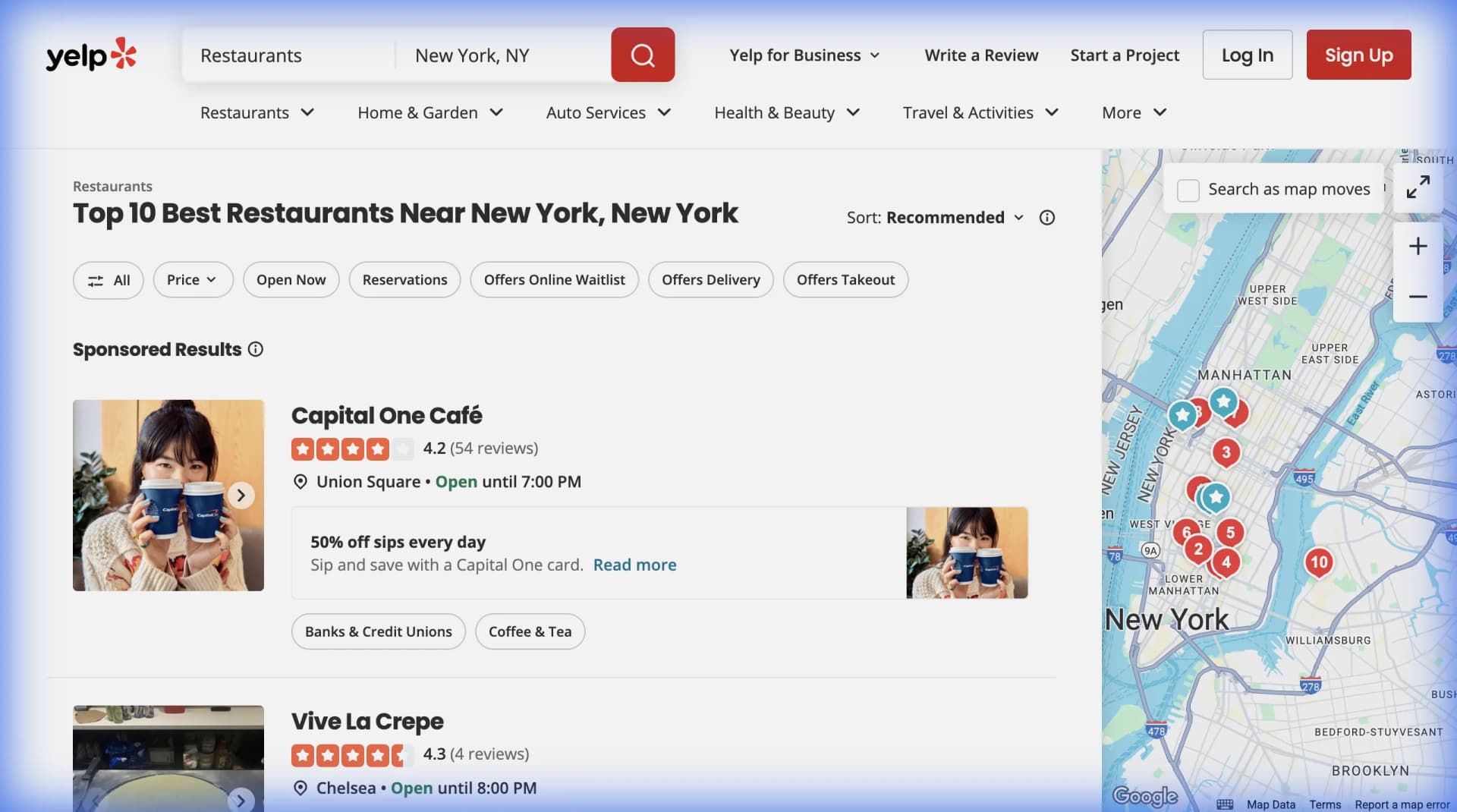
Why Directory Websites Still Work in 2026
Before diving into the how, it is worth understanding why directories remain viable when Google seems to answer every question.
The Value of Curation
Google is comprehensive but overwhelming. A search for "best coffee roasters in Portland" returns millions of results. A curated directory of specialty coffee roasters, with detailed profiles, photos, and verified reviews, provides focused value that a general search cannot match.
Successful directories thrive by offering:
- Curated quality: Every listing meets specific criteria
- Structured information: Consistent data fields make comparison easy
- Community trust: User reviews and editorial oversight build credibility
- Niche expertise: Deep category knowledge that generalist platforms lack
Real Examples of Profitable Niche Directories
Consider these examples of directories that found success by narrowing their focus:
SoakOregon.com focuses exclusively on hot springs in Oregon. Despite its narrow scope, the site attracts approximately 18,000 monthly visitors. The specificity is the value proposition: anyone searching for Oregon hot springs finds exactly what they need.
GetRawMilk.com connects people seeking raw milk with local farms. The site receives over 100,000 monthly visitors because it solves a specific problem (finding a product not available in stores) better than any general-purpose platform could.
Wildlife-Removal.com lists companies offering wildlife removal services and attracts 80,000 to 100,000 monthly visitors. Local service directories like this work because the need is urgent and location-specific.
These examples share common traits: they serve a specific audience, provide information not easily found elsewhere, and have built enough content depth to rank well in search engines.
Step 1: Choose Your Niche Strategically
The most important decision you will make is which niche to target. A directory about "businesses" is too broad to compete. A directory about "vegan-friendly wedding venues in the Pacific Northwest" is specific enough to dominate.
Criteria for a Good Directory Niche
Evaluate potential niches against these factors:
Searchable demand: People must be actively searching for this information. Use tools like Google Keyword Planner, Ahrefs, or even Google Trends to validate search volume. Terms like "best [category] in [city]" or "[industry] directory" indicate directory intent.
Fragmentated information: The niche should lack a dominant directory. If Yelp or Google Maps already serves the need perfectly, you will struggle to differentiate.
Monetizable businesses: The listings should be businesses willing to pay for visibility. Directories of free resources are harder to monetize than directories of service providers or retailers.
Data availability: You need to be able to source accurate data. Some industries publish public listings; others require manual research or web scraping.
Personal interest or expertise: Building a directory requires creating substantial content. Genuine interest in the niche makes the work sustainable.
Niche Ideas for 2026
Based on current trends and market gaps, consider these categories:
| Niche Category | Example Directory Ideas | Monetization Potential |
|---|---|---|
| Local Services | Dog walkers, mobile car detailers, house cleaners by neighborhood | High (businesses need local visibility) |
| Specialty Retail | Vintage record stores, specialty tea shops, independent bookstores | Medium (passionate audiences) |
| Professional Services | Immigration lawyers by specialty, fractional CFOs, executive coaches | High (high-value services) |
| Wellness | Float tanks, cold plunge facilities, breathwork practitioners | Medium-High (growing wellness market) |
| Tech/SaaS | AI tools by use case, no-code tools, developer APIs | High (tech companies have marketing budgets) |
| Sustainable Business | Zero-waste stores, B-corp retailers, carbon-neutral services | Medium (growing conscious consumer base) |
| Events/Venues | Podcast recording studios, retreat centers, unique event spaces | High (event planning is high-value) |
Step 2: Choose Your Tech Stack
Your technology choice depends on your technical skills, budget, and scalability needs. Here are three paths, from simplest to most complex.
Option A: No-Code Stack (Recommended for Most Founders)
The fastest path to launch uses no-code tools that handle hosting, database, and frontend together.
Recommended stack:
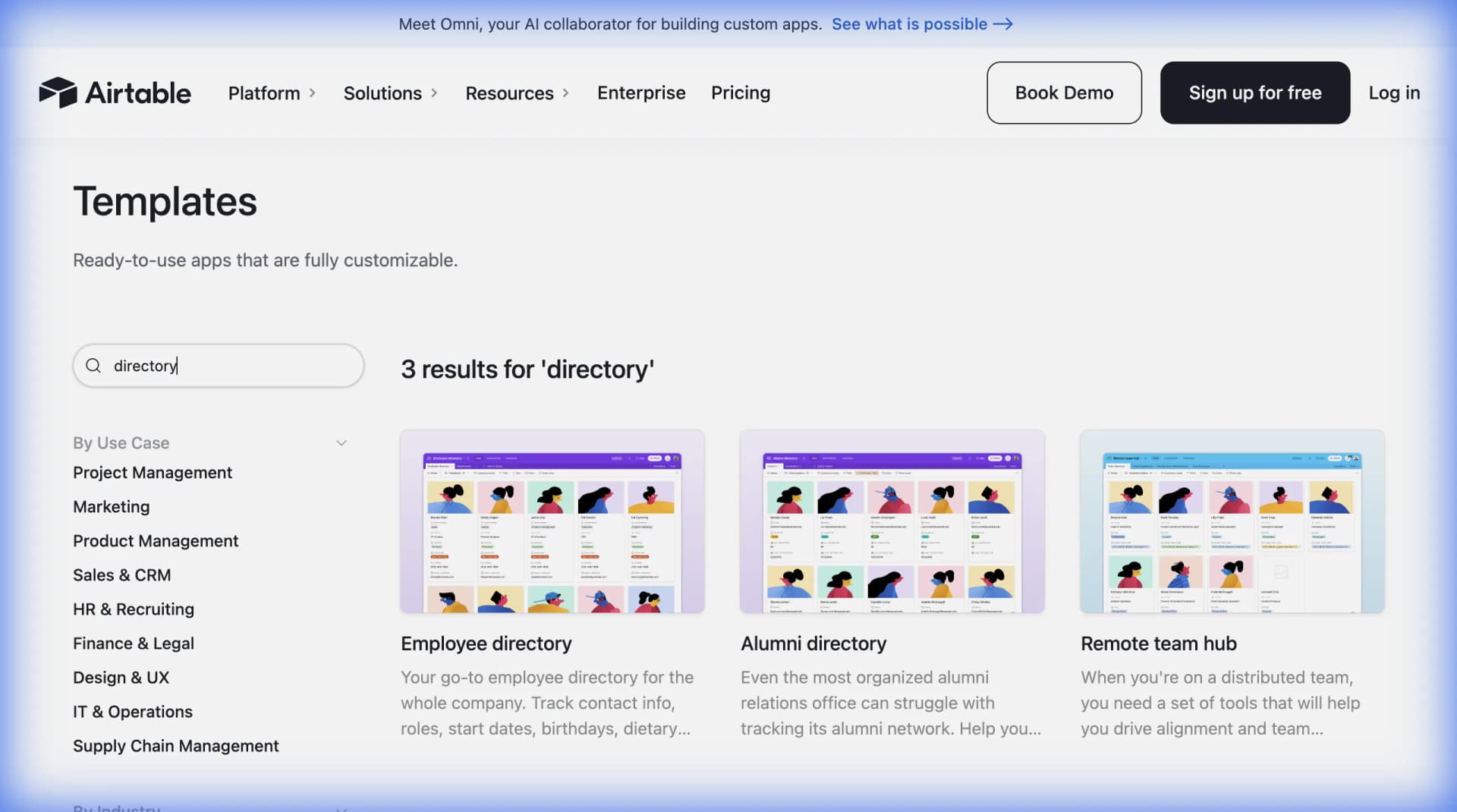
- Airtable for your database (stores all your listings)
- Webflow for your frontend (creates the website)
- Whalesync to sync data between Airtable and Webflow automatically
This combination lets you manage listings in Airtable's spreadsheet-like interface while Webflow handles the visual design. Whalesync keeps everything synchronized: add a listing in Airtable, and it appears on your site automatically. No code required.
Pros:
- Launch in days, not months
- Visual design tools (no coding)
- Easy to update and maintain
- Built-in hosting and security
Cons:
- Monthly subscription costs add up
- Some customization limitations
- Can become expensive at scale
Cost estimate: $50-150/month for tools (Airtable Pro, Webflow CMS, Whalesync)
Option B: WordPress with Directory Plugins
WordPress offers more flexibility with lower ongoing costs, though it requires more initial setup.
Recommended stack:
- WordPress with managed hosting (Cloudways, Kinsta, or WP Engine)
- GeoDirectory or Business Directory Plugin for listing functionality
- Elementor or Oxygen for visual page building
Pros:
- Lower long-term costs (hosting is $20-50/month)
- Extensive plugin ecosystem
- More SEO control
- Full data ownership
Cons:
- Steeper learning curve
- More maintenance required (updates, security)
- Customization requires some technical skill
Cost estimate: $30-100/month for hosting and essential plugins
Option C: Custom Development
For maximum flexibility and scale, build a custom application.
Recommended stack:
- Next.js or Remix for the frontend
- PostgreSQL or MongoDB for the database
- Vercel or Railway for hosting
- Supabase for backend services (auth, database, storage)
Pros:
- Unlimited customization
- Best performance at scale
- Full control over every feature
- Can implement complex business logic
Cons:
- Requires development skills (or budget to hire)
- Longer initial build time
- Ongoing maintenance responsibility
Cost estimate: $20-100/month for hosting (scales with traffic)
Which Stack Should You Choose?
For most founders, start with the no-code stack (Airtable + Webflow + Whalesync). You can launch quickly, validate the market, and migrate to a more scalable solution later if needed. The goal is to test your niche hypothesis before investing heavily in technology.
Step 3: Source Your Directory Data
An empty directory has zero value. Your launch should include at least 100-200 quality listings to provide immediate value to visitors. This is where most directory projects stall.
Manual Data Collection
The most straightforward approach: research businesses manually and enter them into your database.
Works best when:
- Your niche is small (under 500 potential listings)
- Data is not available online in structured form
- You need highly curated, verified information
The problem: Manual entry is slow. Researching and entering 200 listings might take 40+ hours.
Web Scraping: The Scalable Approach
Web scraping automates the collection of business data from public sources like industry association websites, Google Maps, Yelp, or specialized platforms.
Lection makes this process accessible without coding. The browser extension lets you point at data on any webpage, and it automatically extracts structured information, business names, addresses, phone numbers, descriptions, and more.
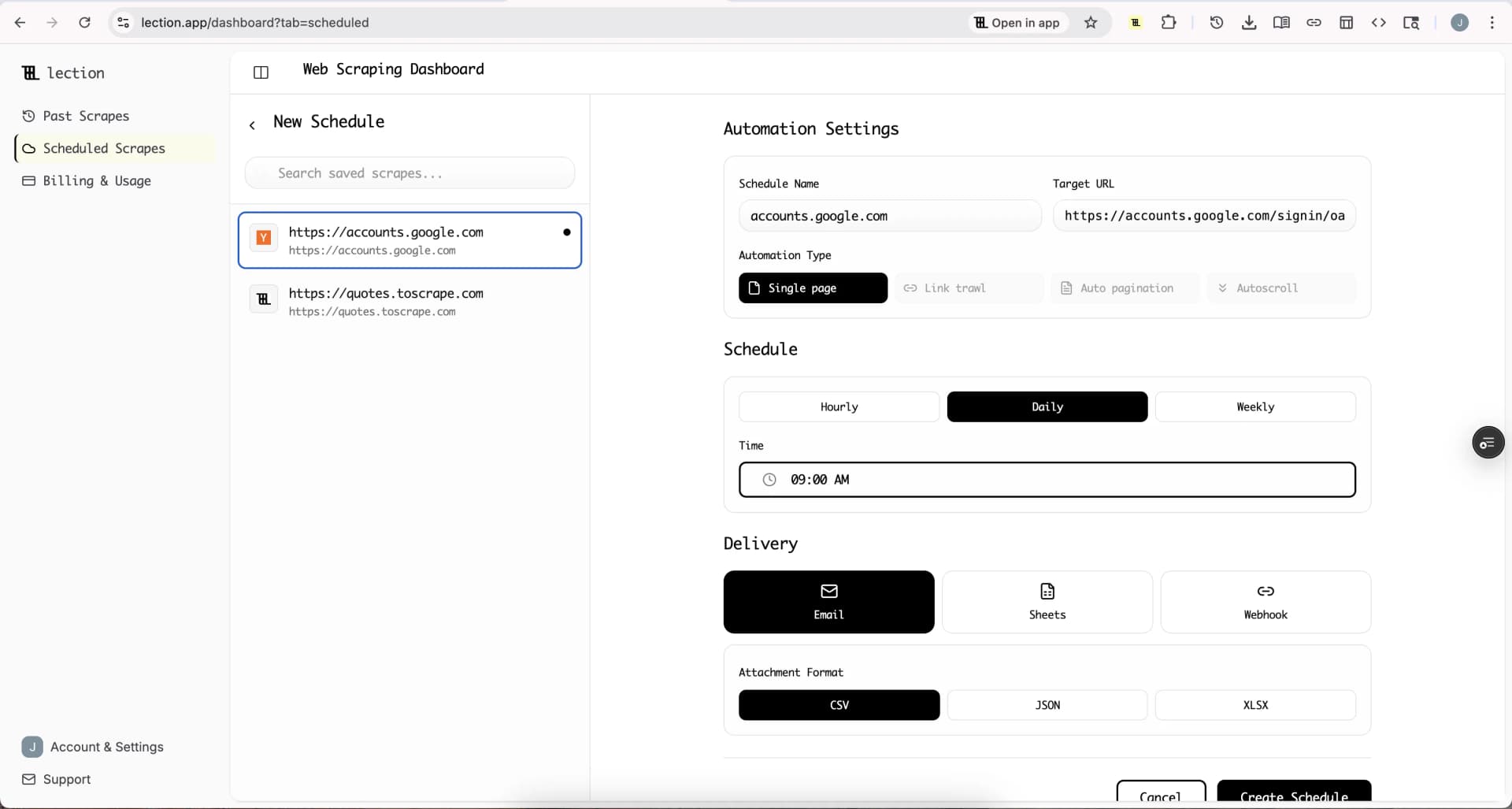
Practical scraping workflow for directories:
-
Identify source websites: Find sites that list businesses in your niche (association directories, review sites, local business listings)
-
Extract with Lection: Navigate to a listing page, open Lection, and select the data fields you want. Lection's AI identifies the pattern and extracts all listings automatically.
-
Handle pagination: Configure Lection to traverse multiple pages, capturing hundreds of listings in a single extraction.
-
Export to your database: Send data directly to Google Sheets, then import to Airtable, or use webhooks to connect directly to your database.
-
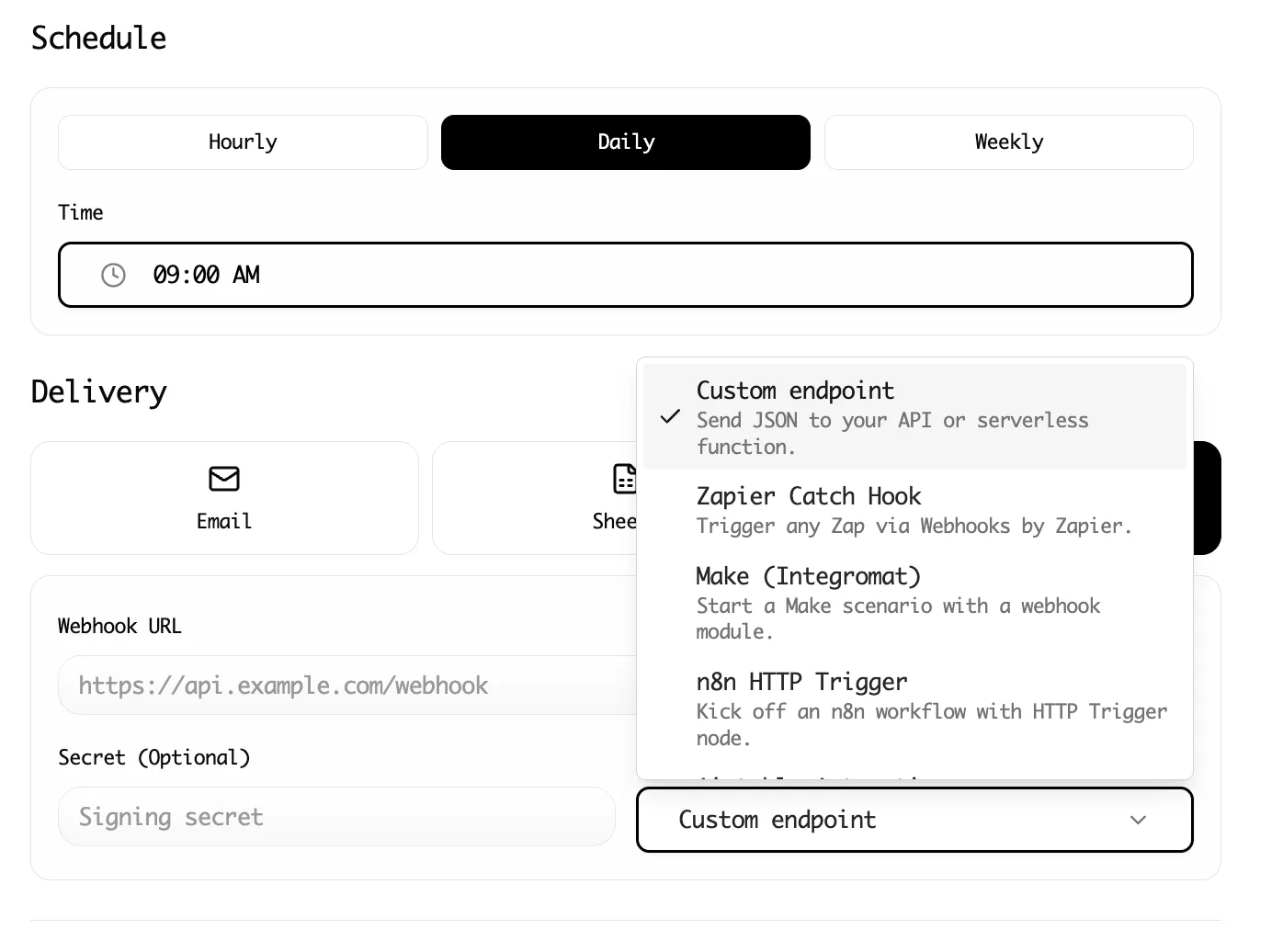
Schedule refreshes: Set up recurring cloud scrapes to keep your data current. Outdated listings damage credibility.
For a deeper dive on data sourcing ethics and legality, see our web scraping legality guide.
Combining Approaches
The most successful directories combine methods:
- Scrape for initial data: Get your first 200+ listings quickly
- Manually verify and enhance: Review scraped data for accuracy, add editorial notes
- Invite submissions: Let businesses submit and claim their listings
- Automate updates: Schedule regular re-scrapes to catch new businesses and changes
Data Fields to Collect
Standard fields for most business directories:
| Field | Required | Notes |
|---|---|---|
| Business Name | Yes | Primary identifier |
| Address | Usually | Full address for local directories |
| Phone | Yes | Primary contact |
| Website | Yes | Link to business |
| Sometimes | For B2B directories | |
| Description | Yes | 100-300 word summary |
| Category | Yes | For filtering/navigation |
| Hours | Sometimes | Especially for retail/restaurants |
| Social Links | Optional | Instagram, LinkedIn, etc. |
| Logo/Photos | Recommended | Visual credibility |
| Pricing | Sometimes | If relevant to niche |
Step 4: Design for SEO from Day One
Directories live and die by organic search traffic. Design your information architecture and page structure for search engine visibility.
URL Structure
Create SEO-friendly URLs that include keywords:
/businesses/portland-or/for city pages/category/coffee-roasters/for category pages/listing/stumptown-coffee-portland/for individual listings
Avoid: /listing?id=12345 or other parameter-based URLs.
Individual Listing Pages
Each listing should have its own page with:
- Unique title tag: "[Business Name] | [Category] in [City] | [Your Directory Name]"
- Meta description: A compelling summary including location and specialty
- Structured data: Implement LocalBusiness schema markup for rich snippets
- Unique content: Avoid duplicate descriptions; add editorial context where possible
Category and Location Pages
Create landing pages for each category and location combination:
/category/yoga-studios/lists all yoga studios/location/austin-tx/lists all Austin businesses/category/yoga-studios/austin-tx/lists Austin yoga studios specifically
These pages target "best [category] in [city]" searches directly.
Content Beyond Listings
Supplement your directory with editorial content:
- Best-of guides: "10 Best Coffee Roasters in Portland (2026)"
- How-to content: "How to Choose a Wedding Photographer"
- Industry news: Updates relevant to your niche
This content drives additional organic traffic and establishes authority.
Step 5: Plan Your Monetization Strategy
Directories offer multiple revenue streams. Most successful directories combine several models.
Freemium Listings
The foundation of most directory business models:
- Free tier: Basic listing (name, address, phone, website, short description)
- Premium tier: Enhanced listing with photos, longer description, priority placement, backlink, analytics
Free listings attract businesses and create comprehensive coverage. Premium upsells generate revenue.
Pricing guidance: Premium listings typically range from $10-50/month for local businesses, $50-200/month for B2B or professional services.
Featured Placements
Sell prominent positions:
- Top of category pages
- Homepage featured section
- "Sponsored" badge with priority in search results
These are one-time or recurring fees separate from premium listings.
Display Advertising
Once you have traffic, sell ad space:
- Banner ads on category pages
- Sidebar placements
- Newsletter sponsorships
Use direct sales for premium rates or programmatic (Google AdSense) for passive income.
Lead Generation
For service-oriented directories:
- Capture user inquiries ("Request a Quote")
- Sell leads to listed businesses on a per-lead or subscription basis
High-value niches (lawyers, financial advisors, contractors) support premium lead pricing.
Affiliate Partnerships
If your niche involves products or software:
- Earn commissions on referrals
- Display affiliate links in relevant context
This works especially well for tech/SaaS directories.
Suggested Revenue Mix for Launch
| Revenue Stream | % of Revenue (Year 1) | Priority |
|---|---|---|
| Premium Listings | 50-70% | Primary focus |
| Featured Placements | 15-25% | Secondary |
| Display Ads | 5-15% | After reaching 10k+ monthly visitors |
| Lead Gen / Affiliate | 10-20% | If niche supports it |
Step 6: Launch Your Directory
With your tech stack configured, data loaded, and monetization planned, it is time to launch.
Pre-Launch Checklist
- 100-200 quality listings loaded
- All listing pages rendering correctly
- Category and location pages working
- Search and filter functionality tested
- Mobile responsiveness verified
- Basic SEO (title tags, meta descriptions, schema) implemented
- Google Analytics and Search Console connected
- Business submission form working
- Contact page and basic legal pages (privacy policy, terms) in place
Launch Marketing
Week 1: Announce and seed
- Post in relevant communities (Reddit, Twitter/X, niche forums)
- Email friends and professional contacts
- Submit to relevant newsletters
Week 2-4: Outreach
- Email businesses included in the directory, inviting them to claim/enhance listings
- Reach out to industry blogs for potential coverage
- Write and publish your first editorial content pieces
Ongoing:
- Consistent content publishing (1-2 posts per week)
- Social media updates featuring specific listings
- Respond to user feedback and continuously improve
Step 7: Keep Your Data Fresh
Stale data destroys directory credibility. A visitor who calls a disconnected number or visits a closed business will not return.
Automated Monitoring
Use scheduled web scraping to refresh data regularly:
- Re-scrape source sites monthly to catch new businesses and closures
- Verify contact information quarterly using validation services
- Monitor for broken website links using automated checkers
Lection's cloud scraping feature enables fully automated data refreshes. Set up a recurring schedule, and fresh data flows into your spreadsheet or database without manual intervention.
User-Reported Updates
Enable users to flag outdated information:
- "Report a problem" button on each listing
- Simple correction form
- Review and implement updates promptly
Business Owner Claims
Let business owners claim their listings:
- Verification process (email, phone, or document)
- Dashboard for updating their own information
- This ensures accuracy while reducing your workload
Common Mistakes to Avoid
Learn from others' failures:
Launching with too few listings: An empty or sparse directory provides no value. Wait until you have at least 100 quality listings before promoting.
Choosing too broad a niche: "All businesses" cannot compete with Yelp or Google. Narrow your focus ruthlessly.
Ignoring mobile: Over 60% of directory searches happen on mobile devices. Responsive design is not optional.
Neglecting SEO from the start: Retrofitting SEO is painful. Build with search visibility in mind from day one.
Setting unsustainable prices: Research what similar directories charge. Pricing too high limits adoption; pricing too low undervalues your platform.
Abandoning updates: A directory that stops updating becomes a liability. Plan for ongoing maintenance before you launch.
Tools and Resources Summary
Tech Stack Options
| Approach | Tools | Best For |
|---|---|---|
| No-Code | Airtable + Webflow + Whalesync | Fast launch, non-technical founders |
| WordPress | WordPress + GeoDirectory + Elementor | Lower costs, more flexibility |
| Custom | Next.js + PostgreSQL + Vercel | Maximum control, scalable |
Data Collection
| Tool | Use Case |
|---|---|
| Lection | AI-powered web scraping for listing data |
| Google Sheets | Data staging and manipulation |
| Airtable | Structured database for listings |
SEO and Analytics
| Tool | Use Case |
|---|---|
| Google Search Console | Monitor search performance |
| Ahrefs / SEMrush | Keyword research, competitor analysis |
| Schema.org | Structured data markup |
Conclusion
Building a successful business directory in 2026 requires strategic niche selection, thoughtful technology choices, reliable data sourcing, and disciplined execution. The barrier to entry has never been lower: no-code tools let you launch a professional directory in days, and web scraping tools like Lection make populating your database scalable.
The key is starting focused. Choose a niche where you can provide unique value, build comprehensive coverage with quality listings, and design for organic search visibility from day one. Monetization follows naturally from the value you create.
Ready to start building? Install Lection and begin extracting the data that will power your directory.