Real estate research involves drowning in browser tabs. You search Zillow for properties in a target neighborhood, and suddenly you're clicking through 47 listings, copying addresses into a spreadsheet, switching back to grab prices, then square footage, then days on market. An hour later, you have 12 rows and the growing suspicion that you're doing something very wrong.
This manual approach breaks immediately at scale. If you're an investor analyzing 500 properties across three cities, a real estate agent building comprehensive market reports, or a researcher studying housing trends, copy-pasting from Zillow isn't research. It's data entry masquerading as analysis.
This guide shows you how to extract Zillow listing data automatically using no-code tools like Lection. You'll learn what data is available, how Zillow protects against scraping, and step-by-step methods to build structured datasets without writing a single line of code.
Why Scrape Zillow Data?
Zillow aggregates more real estate data than any other public platform. Over 110 million US properties have Zillow listings with historical data, valuations, and market context. This makes it invaluable for several use cases.
Comparative market analysis. Real estate agents build CMAs by comparing similar properties in a neighborhood. Manually gathering data for 20 comparable properties takes hours. Automated extraction cuts this to minutes.
Investment research. Investors need to analyze property prices, rent estimates, and historical appreciation across entire markets. A single investment decision might require data from hundreds of listings to identify undervalued opportunities.
Academic research. Housing economists, urban planners, and policy researchers study patterns across thousands of properties. Questions about neighborhood pricing dynamics, renovation impacts, or market recovery require datasets that manual collection cannot produce.
Lead generation. Mortgage brokers, home service providers, and contractors use new listing data to identify potential clients. Fresh listings represent homeowners likely to need services soon.
Market intelligence. Understanding inventory levels, price movements, and days-on-market trends helps anyone in real estate make better decisions. But insights require data, and data requires extraction at scale.
What Data Can You Extract From Zillow?
Zillow listings contain rich structured data beyond the obvious price and address. Here's what's available for extraction:
Property identification:
- Full street address (street, city, state, ZIP code)
- Zillow Property ID (ZPID) for unique identification
- Latitude and longitude coordinates
- Parcel number
Pricing and valuation:
- Current list price and price history
- Zestimate (Zillow's automated valuation)
- Rent Zestimate for rental analysis
- Tax assessment values
- Price per square foot
Property characteristics:
- Bedrooms and bathrooms count
- Living area square footage
- Lot size
- Year built
- Property type (single family, condo, townhouse, etc.)
- Parking capacity and garage details
Listing details:
- Listing status (for sale, pending, sold, off market)
- Days on Zillow
- Views and saves count
- Listing agent and agency information
- Open house schedules
Additional features:
- Property description text
- HOA fees
- Home insights and features
- Annual home insurance estimates
- High-resolution photos (as URLs)
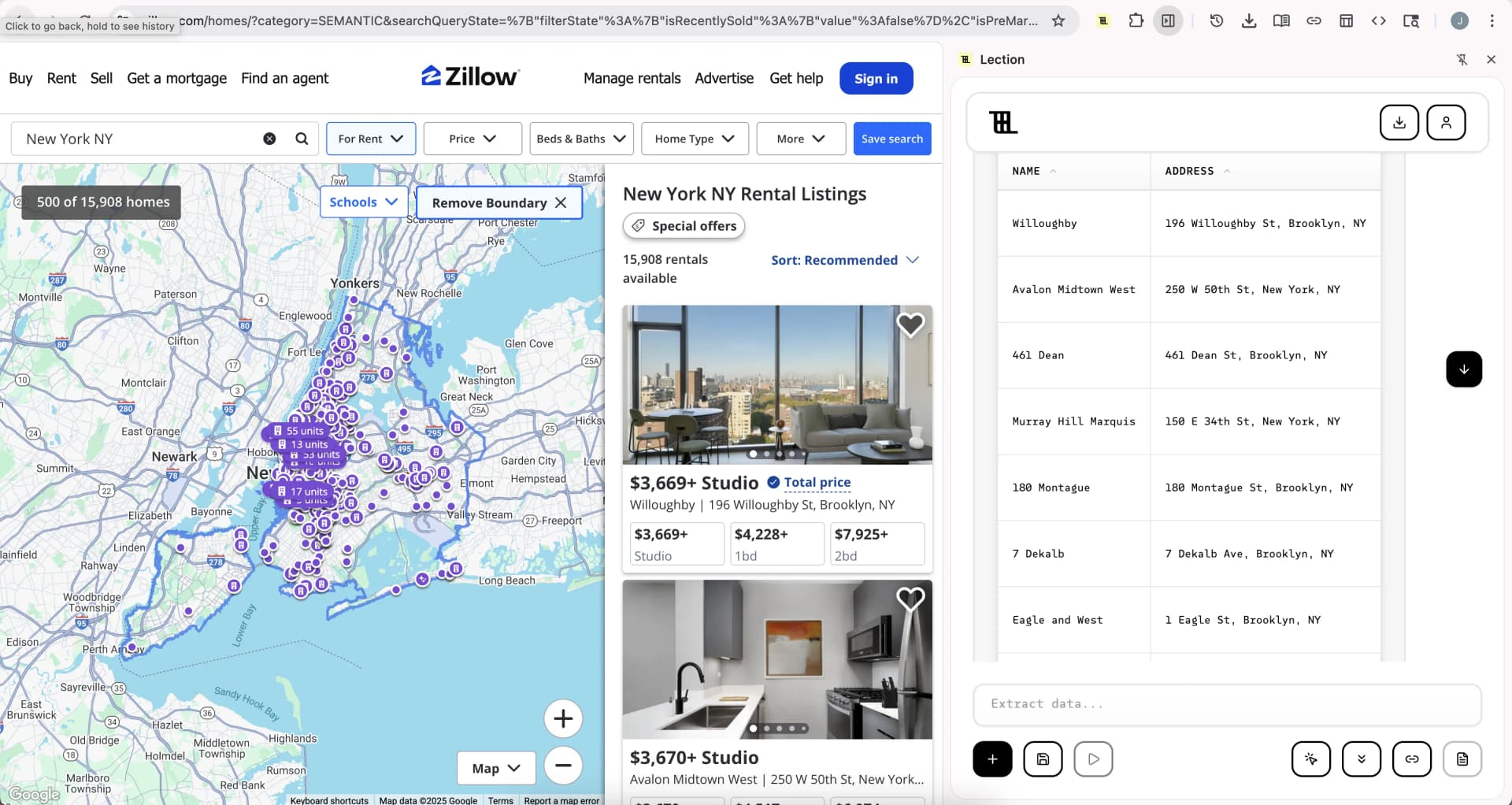
Why Scraping Zillow Is Challenging
Zillow actively protects its data with sophisticated anti-bot measures. Understanding these challenges helps you choose the right extraction approach.
Terms of Service
Zillow's terms explicitly prohibit automated data collection without permission. Their Terms of Use state that you may not use scrapers, robots, or other automated means to access the service. Violating these terms can result in IP blocks, account suspension, or in rare cases legal action.
This doesn't mean scraping is impossible, but it means responsible scraping requires care. For personal research and small-scale data collection, the practical risks are minimal. For commercial use at scale, consult with a lawyer familiar with data privacy and terms of service issues.
Technical Protections
Zillow employs multiple layers of technical protection:
IP blocking. High-frequency requests from a single IP address trigger automatic blocks. Zillow recognizes patterns that indicate bot activity.
CAPTCHA challenges. Human verification challenges appear when the system suspects automated access. Services like HUMAN Security (formerly PerimeterX) power these protections.
Dynamic content loading. Property listings load via JavaScript after the initial page render. Simple HTTP requests that don't execute JavaScript see incomplete data.
Rate limiting. Even if individual requests succeed, rapid-fire queries return errors or incomplete results.
Layout changes. Zillow regularly updates its interface. CSS selectors that worked yesterday break tomorrow when class names change.
Why AI-Powered Tools Handle This Better
Traditional scrapers rely on CSS selectors or XPath expressions that target specific HTML elements. When Zillow changes a div class from property-price to listingPrice, these scrapers fail silently or return garbage data.
AI-powered tools like Lection use visual recognition instead. They understand that the large number next to the dollar sign is the price, regardless of the underlying HTML structure. This approach adapts automatically when layouts change, dramatically reducing maintenance burden.
Method 1: Scraping Zillow with Lection (No-Code)
Lection provides the simplest path from Zillow listings to structured spreadsheet data. Here's the complete workflow.
Step 1: Install the Chrome Extension
Add the Lection Chrome extension to your browser. The installation takes about 30 seconds and requires no configuration.
Step 2: Navigate to Zillow Search Results
Go to Zillow and search for properties in your target area. Apply any filters you need: price range, bedrooms, property type. The search results page shows listings that match your criteria.
Wait for the page to fully load. Zillow loads content dynamically, so give it a few seconds to render all property cards.
Step 3: Start the Extraction
Click the Lection icon in your Chrome toolbar to open the extension. Lection's AI scans the page and identifies the data pattern automatically. You'll see it recognize the repeated listing structure with properties like address, price, beds, baths, and square footage.
Step 4: Select Your Data Fields
Choose which fields you want to extract. For a comprehensive dataset, you might select:
- Property address
- List price
- Bedrooms and bathrooms
- Square footage
- Lot size
- Days on market
Lection lets you name these columns however you want in your output.
Step 5: Handle Pagination
Zillow search results paginate across multiple pages. Enable Lection's pagination feature to automatically navigate through all results pages, extracting listings from each one.
For large searches, you might encounter hundreds of pages. Lection handles this in the cloud, running through pages without requiring your browser to stay open.
Step 6: Extract Individual Property Details
For deeper data, use Lection's deep link feature. The scraper visits each property's individual listing page and extracts additional details not visible on search results: full property descriptions, price history, tax records, and more.
.webp&w=1920&q=75&dpl=dpl_A7BYHfQqQeuQD96qn5xPDB6tJGtB)
Step 7: Export to Your Destination
Once extraction completes, export your data. Lection supports:
- Google Sheets (direct integration)
- CSV download
- Excel format
- JSON for developers
You can also connect to Zapier, Make, or Notion to feed data into automated workflows.
Method 2: Scheduled Cloud Scrapes
For ongoing market monitoring, manual extraction isn't practical. You need automated collection that runs on a schedule.
Setting Up Recurring Extraction
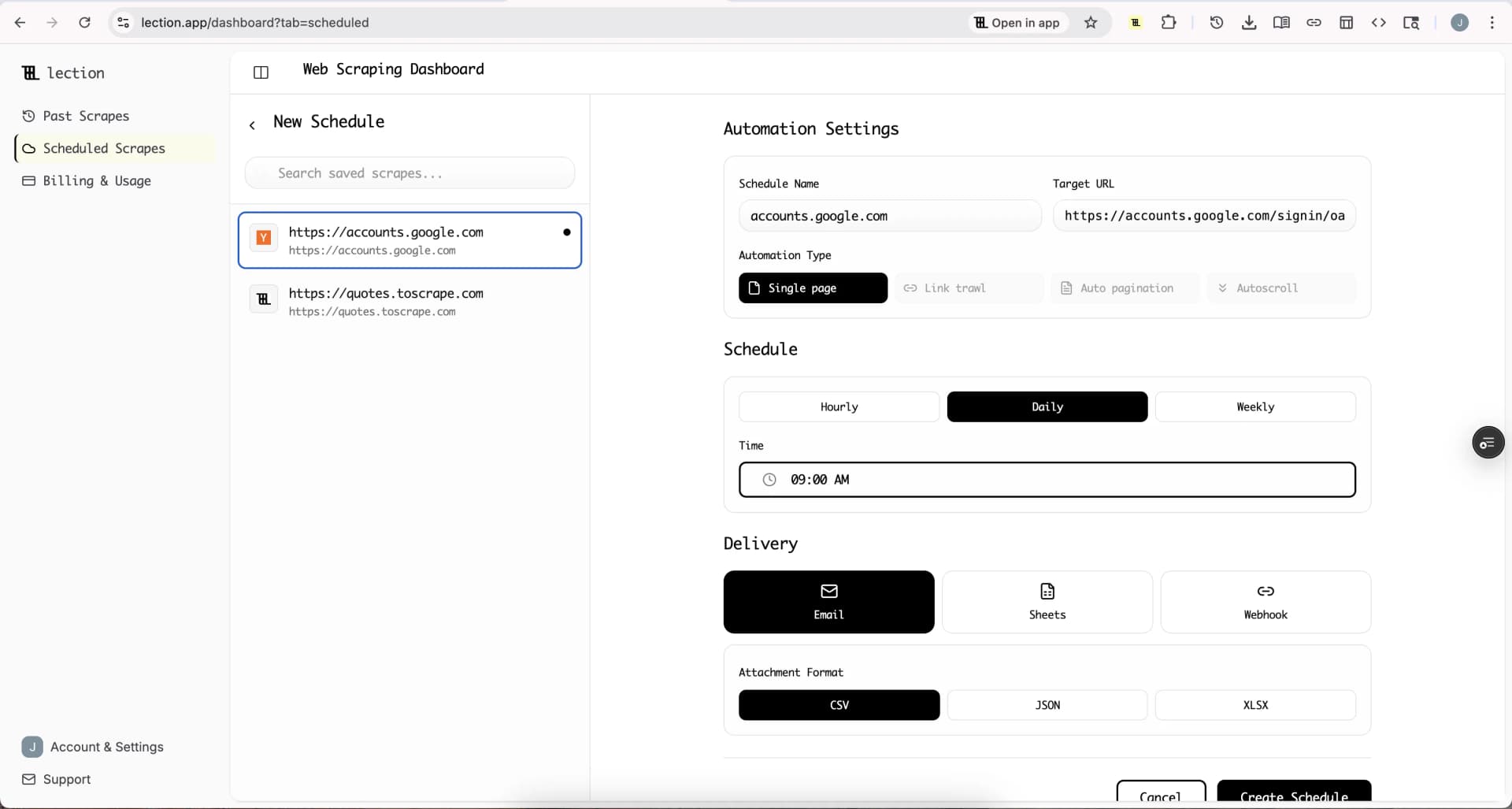
Lection's cloud scraping feature lets you schedule Zillow extractions to run daily, weekly, or at any interval you need.
Configure once, run forever. Set up your extraction template pointing at a Zillow search URL. Define which fields to collect. Set the schedule.
Fresh data while you sleep. A 6 AM daily scrape means current market data waiting in your spreadsheet when you start work.
Append or overwrite. Choose whether new data adds to existing rows (building a historical dataset) or replaces them (keeping only current listings).
Practical Example: Investment Market Tracker
An investor tracking rental properties in Austin might configure:
- Zillow search URL filtered to multi-family properties, $200K-$500K
- Fields: address, price, beds, baths, sqft, Zestimate, days on market
- Schedule: daily at 7 AM
- Output: appending to a Google Sheet
Each morning, new listings appear in the spreadsheet. A simple conditional formatting rule highlights properties where list price falls significantly below Zestimate, flagging potential deals for further research.
Data Quality and Validation
Extracted data requires validation before analysis. Common issues include:
Missing values. Not all listings have every field. Some lack square footage, others don't show days on market. Your analysis needs to handle nulls gracefully.
Format inconsistencies. Price might come as "$425,000" or "425000" depending on extraction method. Beds/baths might be "3 bd, 2 ba" or separate numeric fields.
Stale data. Properties sell, prices change, listings expire. If you're scraping for decision-making, verify critical listings manually before acting.
Duplicate entries. Listings that appear in multiple search queries create duplicates. Deduplicate on ZPID (Zillow Property ID) which uniquely identifies each property.
Building a Clean Dataset
A typical data cleaning workflow:
- Remove rows with missing essential fields (address, price)
- Standardize price to numeric format
- Calculate derived fields (price per sqft)
- Deduplicate on ZPID
- Add extraction timestamp for tracking data freshness
Tools like Google Sheets formulas, Excel Power Query, or simple Python scripts handle this cleanup efficiently.
Legal and Ethical Considerations
Responsible data collection means understanding the boundaries.
Personal vs commercial use. Extracting data for your own investment research differs from building a commercial product. Personal use typically carries minimal risk. Commercial applications require careful legal review.
Respect rate limits. Even when technically possible, hammering Zillow's servers with aggressive scraping strains their infrastructure and increases likelihood of blocks.
Don't republish raw data. Zillow's content, including property descriptions and photos, has copyright protection. Extracting for analysis is different from republishing their content on your website.
Consider robots.txt. While not legally binding, robots.txt signals the site owner's preferences about automated access. For more on this topic, see our complete guide to robots.txt.
Understand data privacy. Property data is generally public record. But combining it with other data sources could raise privacy concerns, especially when identifying individual property owners.
For a broader view of scraping legality, review Web Scraping Legality by Country (2025).
Alternative Approaches
Zillow's Official APIs
Zillow offers APIs through its Bridge Interactive platform for approved partners. These provide:
- Public records data
- Zestimates
- Market statistics
However, these APIs primarily serve real estate professionals with existing business relationships. They don't offer open access for general data collection. And most restrict local data storage, meaning you query for display rather than building datasets.
Paid Scraping Services
Several commercial services specialize in Zillow data:
Bright Data, Oxylabs, and similar providers offer managed scraping with proxy infrastructure. They handle rate limiting, IP rotation, and CAPTCHA solving. Pricing runs $0.001-$0.01+ per page.
Pre-built datasets are available from data marketplaces. You buy historical or current Zillow data someone else extracted. This avoids scraping entirely but limits customization.
Custom scraping development through freelancers or agencies can build tailored solutions. Expect significant cost ($5K-$20K+) and ongoing maintenance.
For most users, no-code tools like Lection offer the best balance of capability, cost, and simplicity. You get the data you need without infrastructure complexity or developer costs.
Common Problems and Solutions
Problem: Extraction returns empty data Zillow loads content via JavaScript. Ensure your tool renders JavaScript before extraction. Lection handles this automatically. Simple HTTP-based scrapers fail because they see only the initial HTML without dynamic content.
Problem: Getting blocked after a few pages You're requesting too fast. Use tools with built-in rate limiting and IP rotation. Lection's cloud scraping manages this automatically.
Problem: Prices show wrong format
Extract the raw text and clean it in your spreadsheet. A formula like =VALUE(SUBSTITUTE(SUBSTITUTE(A1,"$",""),",","")) converts "$425,000" to 425000.
Problem: Missing listings from search Zillow personalizes and varies results. Different sessions may show different listings. For comprehensive coverage, extract multiple times or use broader search filters.
Problem: Previous scrape template stopped working Zillow updated their layout. With selector-based scrapers, you need to update your configuration. With AI-powered tools like Lection, the model adapts automatically to layout changes.
Building Your Real Estate Data Workflow
Scraping is one step in a larger workflow. Here's how extracted Zillow data fits into practical real estate analysis.
Data collection → Analysis → Action
- Collect listings via scheduled Lection scrapes
- Clean data using spreadsheet formulas or scripts
- Enrich with additional sources (school ratings, crime data, commute times)
- Analyze using pivot tables, charts, or statistical tools
- Alert on conditions that match your criteria (price drops, new listings)
- Act by contacting sellers, making offers, or updating reports
For the automation layer, connecting Lection to Zapier enables automated notifications when new listings match your criteria.
Conclusion
Zillow's massive property database becomes genuinely useful only when you can extract data at scale. Manual copy-pasting works for five properties. It fails at fifty. And it's impossible at five hundred.
Tools like Lection bridge this gap by providing no-code extraction that handles Zillow's dynamic pages and anti-bot measures automatically. Whether you're building market analyses, tracking investment opportunities, or conducting research, automated extraction transforms what's possible.
Ready to start? Install Lection and extract your first Zillow dataset in minutes.