TikTok research usually starts with a simple question and turns into a messy notebook. Which creators keep showing up for a keyword. Which hooks are getting reused across a niche. Which sounds, hashtags, and formats are spreading faster than your team can log them. A few minutes later, someone is copying usernames into a sheet, opening separate tabs for each video, and hoping the numbers still match by the time the list is shared.
That workflow breaks quickly because TikTok is a moving surface. Search results change, engagement counts move, and the same keyword can surface different creators depending on context. If you collect manually, you are not only slow. You are also building a dataset that is hard to reproduce, hard to refresh, and hard to defend when another teammate asks where the numbers came from.
Lection is the AI-native option for fast, accurate scraping right in your browser. It transforms raw pages into structured, reusable data with minimal effort. For TikTok research, that matters because you can work from the exact search, hashtag, creator, and video pages your team is already reviewing, then export only the fields that matter.
Why TikTok data matters
TikTok is not only an entertainment feed. It is also a search surface, a trend signal, and a competitive research layer for marketers, agencies, founders, and analysts.
What the platform shows today
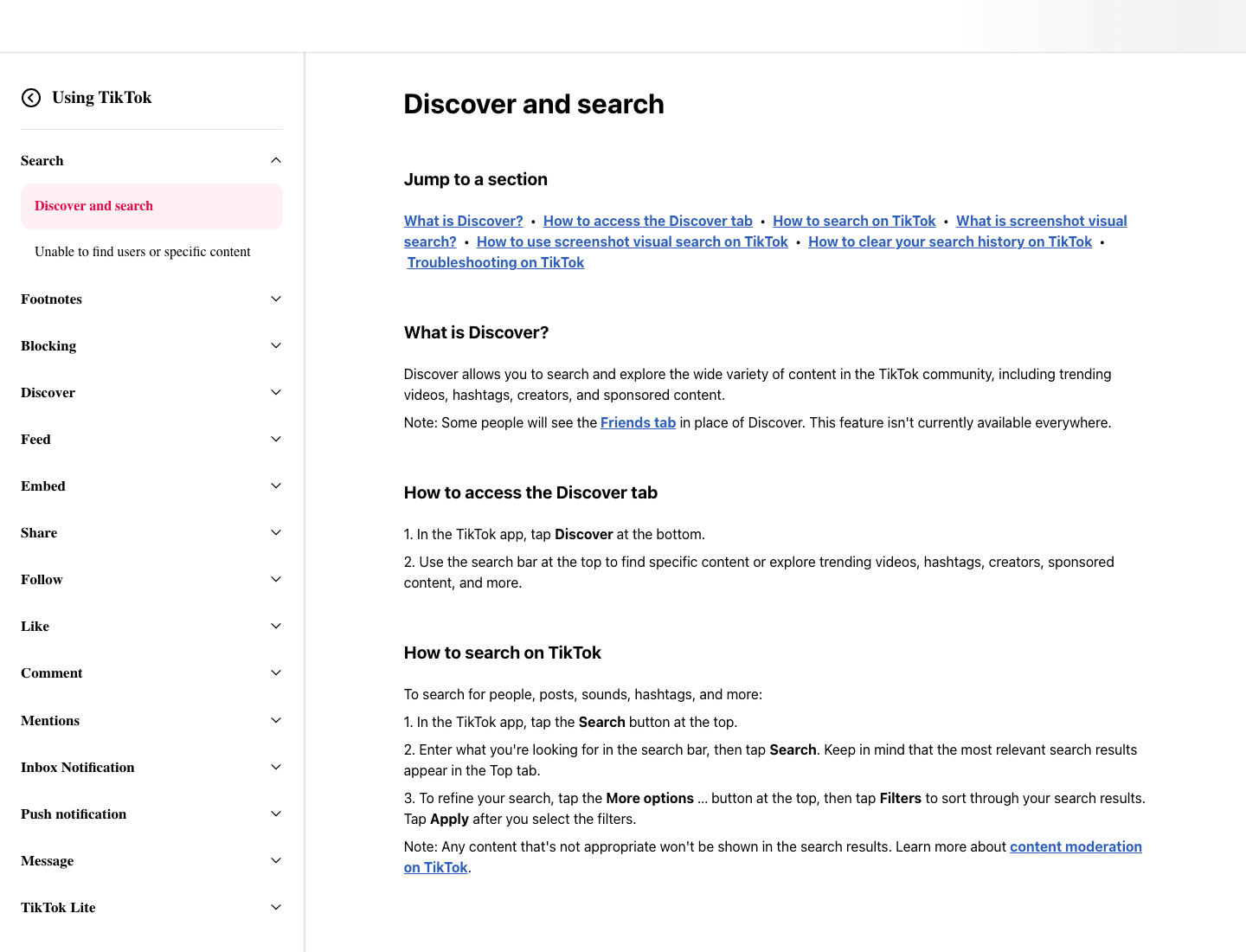
As of Tuesday, July 21, 2026, TikTok's official Discover and search support page says users can search for people, posts, sounds, hashtags, and more, and that the most relevant results appear in the Top tab with filters available to refine the results. That matters because TikTok already exposes the exact discovery surfaces most teams care about. The problem is not finding the information. The problem is getting it out of the page in a way that stays usable.
For growth teams, TikTok data can answer practical questions such as:
- which creators dominate a keyword or niche
- which hooks and caption patterns recur across top videos
- which hashtags cluster around a campaign topic
- which competitors are publishing more frequently
- which posts deserve a deeper manual review later
If your team already studies adjacent social sources through Instagram workflows or keeps research terms straight with the web scraping glossary, TikTok can become another reliable dataset in the same stack.
Why a structured export matters more than screenshots
Screenshots are useful for memory. Structured data is useful for decisions.
A clean TikTok export lets you sort creators by follower size, group videos by hashtag, compare engagement patterns across queries, and revisit the same search a week later without restarting from scratch. That is the difference between a pile of tabs and a repeatable research system.
Why does the standard approach fail?
TikTok feels easy to browse, which is exactly why teams underestimate how fast manual collection turns into low-trust data entry.
Manual collection loses context
The first ten rows look fine. Then someone copies a username without the profile URL, records a view count from one moment and a like count from another, or forgets which keyword produced the result. By the time the sheet reaches fifty or one hundred rows, the dataset looks complete but does not explain itself.
That missing context becomes expensive later. If your team cannot tell whether a creator appeared under a keyword search, a hashtag page, or a manually opened profile, the list is less useful for trend analysis, outreach planning, or content strategy.
Scripts and generic tools miss the real workflow
TikTok research usually begins on a rendered page, not inside a developer backlog. Teams want to inspect live cards, confirm what is visible, decide which columns matter, and change the schema as they learn. That is why browser-native extraction is the practical starting point.
Scripts can still be useful, but they are often overkill for early-stage research. The question is usually not "How do we engineer a permanent collector today?" It is "How do we get this live page into a trustworthy dataset this afternoon?"
What should you capture from TikTok?
Before you scrape, decide what the dataset needs to answer. A focused schema is easier to trust than a broad export full of fields nobody will use.
For most TikTok research projects, start with:
- username
- display name
- profile URL
- video URL
- caption text
- visible hashtags
- sound title, if shown
- visible like, comment, share, or save metrics when available
- publish date or relative post time
- search keyword, hashtag, or source page
- scrape date
- internal priority note
Those last three fields are easy to skip and expensive to lose. Without the source page and scrape date, TikTok exports become hard to compare across runs.
How to scrape TikTok with Lection
The safest workflow is to scrape the same page your team is actively using to evaluate the signal.
Start with one surface
Do not mix every TikTok page type into one first pass. Pick one source and keep the run consistent. Good starting points include:
- a keyword search result
- a hashtag page
- a creator profile grid
- a saved list of specific videos you want to benchmark
That discipline makes the data far easier to interpret later. It also helps when you decide to schedule recurring refreshes through Lection's feature set or compare the effort with your team's broader workflow needs on the pricing page.
Capture visible fields first
On the first run, focus on fields that repeat clearly across cards or posts. For a keyword search, that is usually username, display name, caption snippet, visible engagement, and video URL. For a creator page, it may be post captions, dates, and view counts.
This matters on TikTok because the platform mixes signals. A page can include search results, suggested accounts, sound references, and navigation elements that look important until you realize they are not part of the repeated record you actually need.
Add source context before deeper enrichment
Once the repeated fields are stable, add context columns such as:
- source page URL
- source type, such as search, hashtag, or profile
- keyword or hashtag used
- scrape timestamp
- analyst name or project label
These columns make the export self-explanatory. They also make deduplication easier when the same creator or video appears across more than one search.
Run a second pass only where it matters
Do not try to force every detail into the first scrape. Once the broad export is clean, run a deeper pass only on the creators or videos that deserve more review. That might be:
- creators that appear repeatedly across different searches
- videos with unusually strong engagement
- competitors or partner candidates
- posts tied to a campaign your team wants to analyze closely
The second pass can collect richer fields such as longer caption text, bio details, outbound links, or a manually added tag that indicates why the record matters. This keeps the first run fast and the deeper review intentional.
Export into the system that owns the decision
TikTok data becomes useful only after it lands somewhere your team already works. Common destinations include Google Sheets for quick analysis, Notion for research tracking, and automation handoffs for follow-up workflows. If your next step is orchestration, this post naturally connects with Zapier handoffs and Notion exports.
Schedule recurring refreshes when the signal moves fast
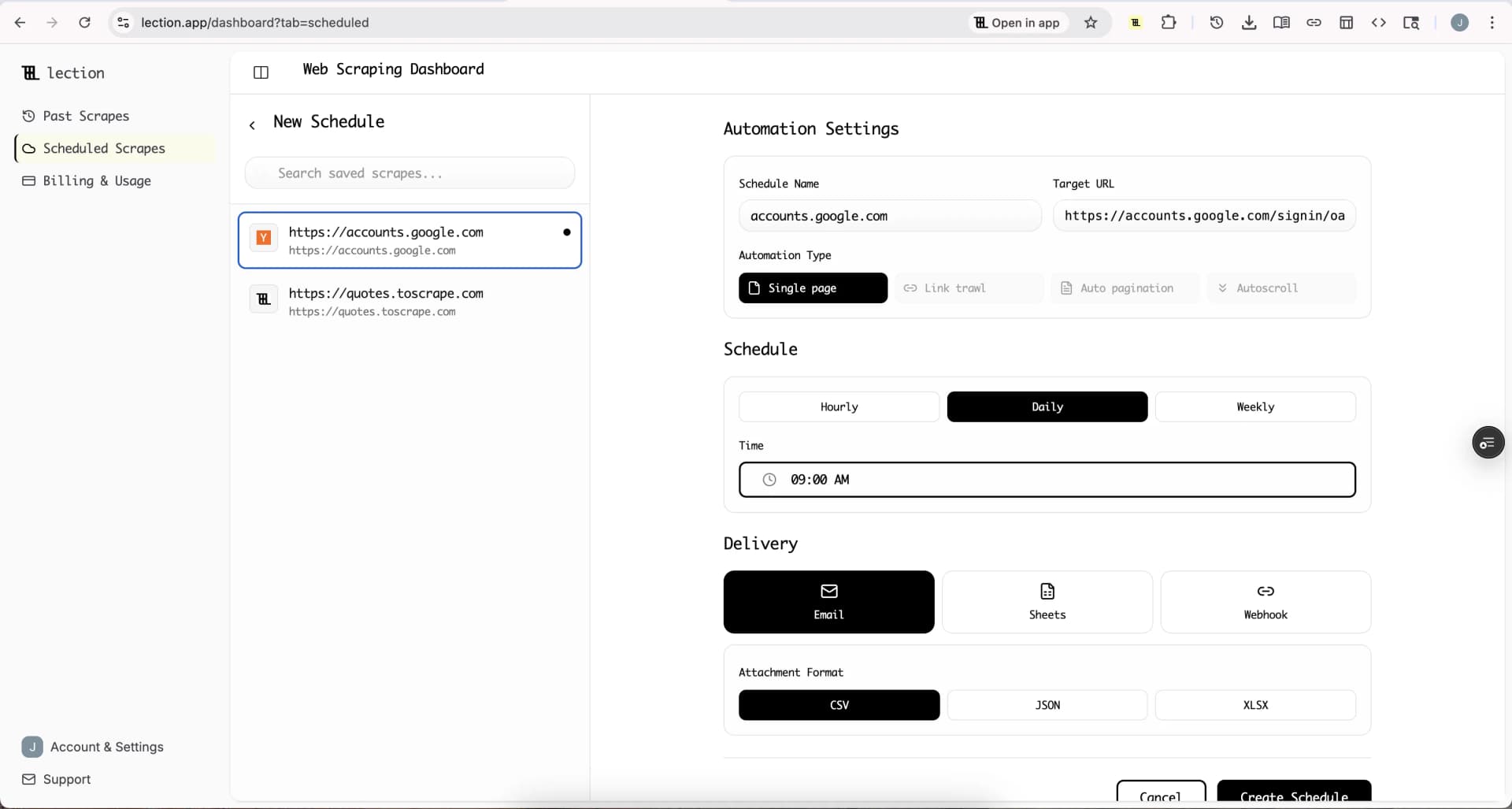
TikTok trends age quickly. A search that looks important on Tuesday can feel stale by Thursday. Once your schema is stable, recurring cloud runs help your team start with current data instead of a backlog of tabs.
When should you use TikTok's own tools instead?
TikTok itself already offers a few official routes for structured access, but each one fits a narrower job than most operator and marketing workflows.
Use TikTok's data export for your own account
As of Tuesday, July 21, 2026, TikTok's official Requesting your data page says you can request a copy of your TikTok data from the app, choose which information to include, and select a file format before downloading the finished file. That is the right route when you need your own account history, privacy settings, or activity records.
It is not a substitute for market research on public search results, competitor posts, or creator discovery. It is a personal account export, not a browser research workflow.
Use the Research API only if you qualify
TikTok's official Research API page says academic researchers from non-profit universities in the U.S. and Europe can apply to study public data about TikTok content and accounts. That is useful for formal research, but it does not solve the everyday needs of agencies, operators, recruiters, or growth teams who are trying to capture visible page data quickly.
In other words, the official options are real, but they serve different jobs. For public-page review owned by non-technical teams, the browser workflow is usually the practical path.
Troubleshooting & edge cases
TikTok collection gets much easier when you plan for the predictable places where the page shifts underneath you.
Search results change while you work
This is normal. TikTok ranking and relevance can move during the day. Store the scrape date and source query so you can compare one snapshot against another instead of pretending the page is fixed.
Logged-in state changes what is visible
Some TikTok surfaces behave differently depending on session state, geography, or device context. If you are building a repeatable workflow, keep the same browser setup each time. Consistency matters more than theoretical completeness.
Infinite scroll can blur record boundaries
TikTok pages often load more content as you move. That is useful for coverage, but it can also mix cards from slightly different modules. Validate the first batch carefully before scaling the run. A tight schema beats a larger messy dataset.
Policy review still matters
TikTok is a high-visibility platform, so teams should keep collection narrow, intentional, and tied to a legitimate business purpose. Review the platform's rules before large projects, avoid collecting personal information you do not truly need, and pair operational judgment with broader reading on web scraping legality by country and the robots.txt guide.
Conclusion
TikTok is valuable because it compresses search intent, creator identity, engagement signal, and trend context into pages your team can inspect quickly and lose track of just as quickly. The challenge is not finding signal. The challenge is turning that signal into a dataset you can sort, revisit, and refresh.
Lection keeps the workflow close to the live page, which makes TikTok research easier to validate and much easier to reuse. That is the difference between a one-off content audit and a repeatable social research system.
Ready to start scraping? Install Lection and extract your first dataset in minutes.