Web scraping sounds technical until you realize what it actually is: reading a web page, keeping the parts you need, and putting them somewhere useful. People do this by hand every day without ever calling it scraping. A marketing analyst copies company names from a public directory. A seller records competitor prices before a pricing meeting. A founder builds a prospect list from a review site. Every one of those tasks is data extraction, and every one of them gets tedious at the same moment: when the list grows past a few dozen rows.
That is usually when people assume they need to learn to code. They picture Python scripts, headless browsers, and terminal errors at midnight. The good news is that the no-code side of web scraping has matured. If a page loads in your browser and the data you need is visible, a point-and-click tool can capture it, structure it, and export it, no programming required.
Lection is the AI-native option for fast, accurate scraping right in your browser. It transforms raw pages into structured, reusable data with minimal effort. This guide walks through the ideas a beginner actually needs: what scraping is, how to pick a good source, why the manual approach breaks, and a simple five-step workflow you can repeat tomorrow.
What is web scraping, really?
Web scraping is the process of extracting data from a website into a structured format such as a spreadsheet, CSV, or database. The Wikipedia article on web scraping describes it as the use of software to extract information from websites, usually transforming unstructured page content into structured data.
Two related terms get confused with scraping, and the distinction is useful.
Crawling vs. scraping
Crawling is about discovery. A crawler visits many pages, follows links, and builds a map of what exists. Search engines crawl the web so they can index it. Cloudflare's explainer on web crawlers describes how crawler bots start from known pages and follow hyperlinks to find more. Scraping, by contrast, is targeted. You already know which page or site you care about, and you want the data on it in a usable form.
Scraping vs. APIs
An API is an official, documented way to request data from a service. When a good API exists, it is often the right first choice. Many sites, from public data sources to SaaS products, publish endpoints with clear terms and rate limits. When no API exists, or the data you need only exists in the rendered page, scraping becomes a reasonable alternative. The free public APIs guide covers official sources that make this easy.
Is scraping legal?
The short answer is: it depends. Legality varies by country, by site, by what data you collect, and by how you use it. Public information is not the same as permission to extract everything at any speed. Courts and regulators weigh factors such as terms of service, whether data is public, how much server load you create, and what you do with the data. The web scraping legality by country guide explains the landscape without pretending there is one universal rule.
The practical stance for a beginner: scrape public data at a polite pace, respect terms and robots.txt, keep personal data out of the workflow unless you have a clear lawful basis, and never use scraping to bypass login walls, CAPTCHAs, or explicit blocks.
What you need before you start
No-code scraping does not require a single line of code, but it does require four small things:
- a browser you work in every day
- a source page with repeating, visible structure
- a destination such as Google Sheets, Excel, CSV, Notion, or Airtable
- a clear question that the data answers
That last item matters more than beginners expect. "Scrape this website" is a vague project. "Collect the 300 product listings with price, rating, and in-stock status into a sheet" is a project that finishes. Every workflow step below works better when the question is specific.
How to choose a source worth scraping
Not every page is a good scraping target, and choosing well is half the battle.
Public and visible beats hidden and gated
Aim for pages anyone can open without logging in. Login-gated data introduces account and terms questions that beginners should not inherit on day one.
Repeated structure beats long prose
Tables, lists, cards, and search results are easy to extract because each row follows the same pattern. A single long article page is harder to turn into rows and usually has less spreadsheet value.
Stable pages beat moving targets
A directory, a public dataset page, or a results page with clear filters is easier to capture than a live feed that refreshes every few seconds. Stability makes validation possible: you can check the output against what you saw on screen.
Terms matter before you start
Read the site's terms and robots.txt before investing time. If a site says scraping is prohibited, that is a signal to find another source, not a challenge. The robots.txt guide for web scrapers explains how to read those signals.
Why does the standard approach fail?
The standard approach is simple: open the page, copy the values, paste them into a sheet, repeat. It works for ten rows and collapses around fifty.
Copy-paste errors compound quietly
At some point someone copies the wrong price, skips a row, or pastes a name into the URL column. The sheet looks fine because nobody can see the missing data. By the time the mistake surfaces, the list has grown, and the cleanup is worse than the original task. Our data validation checklist for scraped data exists because these errors are universal.
Manual work does not scale to a schedule
Recurring research is worse. If the directory updates weekly, the copy-paste ritual restarts from zero each time, with new opportunities for error. Most teams do not need faster hands. They need the collection to happen on a schedule with the same structure every run.
Scripts are their own project
Writing a script seems like the upgrade path, and it often is, for engineers. For everyone else, a script introduces dependencies, selectors that break when the site changes, and a maintenance burden that outlives the original need. A checklist for marketing teams shows why repeatable browser-based workflows frequently beat one-off code for business teams.
A no-code scraping workflow in five steps
Here is the mental model that makes no-code scraping feel manageable.
1. Start with a question
Write the question down. "Track the top 200 product listings with price and rating" is better than "get the site data." The question defines which fields you select and what a finished export looks like.
2. Open the page in your browser
Use the same browser and the same filters you would use for manual research. If the real workflow starts with a search query or a filtered category view, start there. You are capturing the page as a human sees it, not requesting it invisibly.
3. Select the visible data
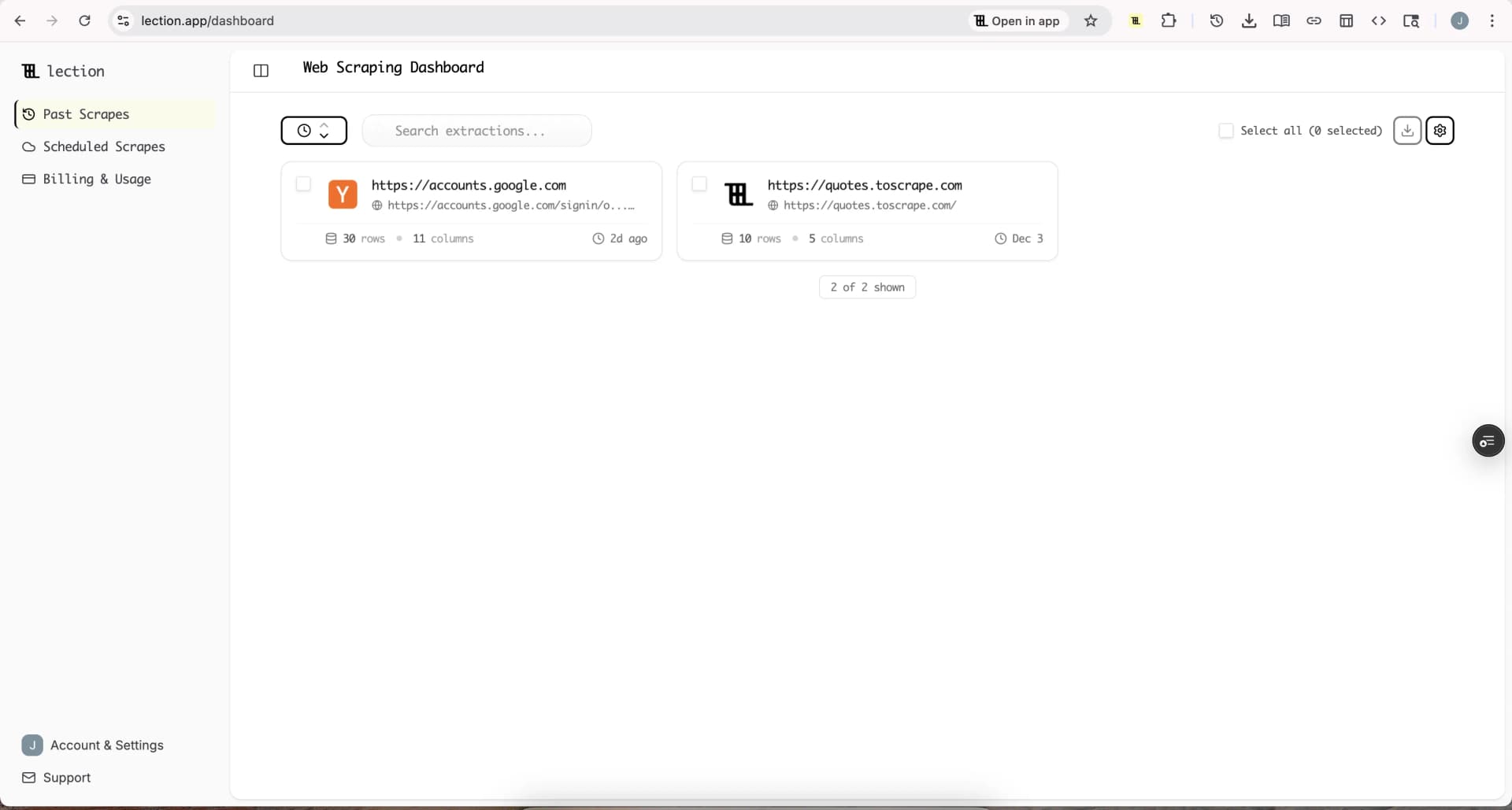
With Lection, you select the repeating elements on the page: the product cards, table rows, or list items that contain the fields you need. The selection works like teaching someone which parts of the page matter. Lection turns the visible structure into columns such as name, price, rating, and URL.
4. Export into the tool you already use
Choose Google Sheets, Excel, CSV, Notion, Airtable, or a connected workflow. Exporting into the system where the data will be used keeps the loop short. Teams that route scraped data into Notion or Airtable rarely go back to orphan CSV files.
5. Validate, then schedule
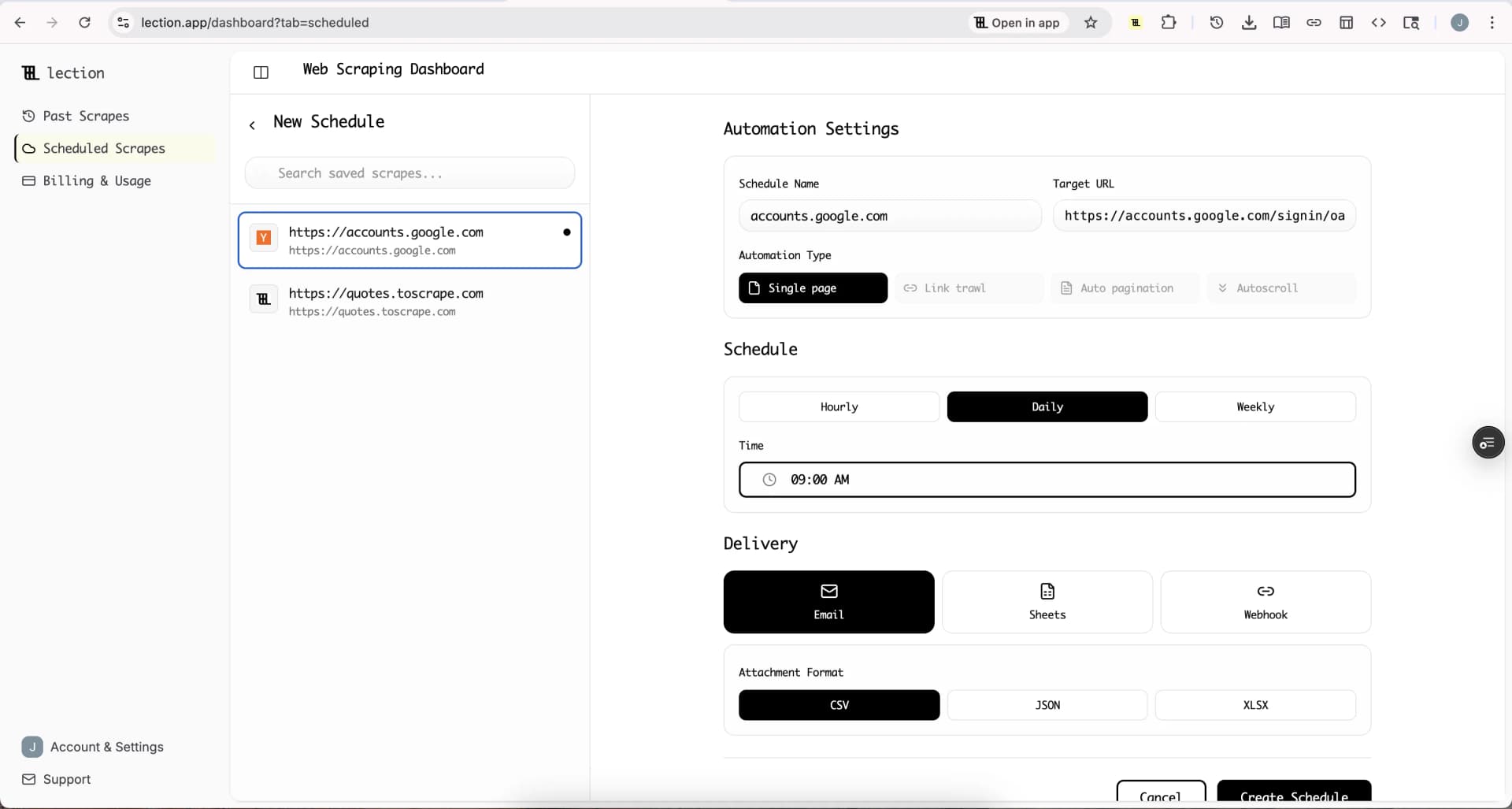
Spot-check the export against the page. Check row counts, sample five rows against the source, and confirm links open the right records. Once the structure is stable, run the collection on a schedule so the sheet stays fresh. Lection's scheduling and cloud scraping options are designed exactly for that transition from one-time extraction to recurring research.
What a good first project looks like
Pick something small, public, and useful to you. A common first project is a list of 100 to 300 items with three or four fields each. For example:
- product listings with name, price, and stock status for a weekly competitor check
- job postings with title, company, and location for market research
- podcast episodes with title, date, and guest for an outreach list
- public directory entries with name, category, and website for lead research
A modest first project teaches the pattern without creating a mess. For a sense of how quickly this practice has spread, see our web scraping statistics for 2026.
Troubleshooting and edge cases
The page changes while you work
Sites redesign, filters change, and layouts shift. If the extraction suddenly captures the wrong fields, return to the live page, re-select the changed section, and re-export. Record the date of each run so you can tell when a dataset was captured.
Rows are duplicated across runs
Keep a stable identifier column, such as a product ID or URL, and deduplicate on it. Appending new runs to the same sheet is safe when you can remove repeats by key.
The data looks wrong
Never trust a clean-looking export. Compare a sample of rows to the source page, check blank fields, and confirm numeric columns contain numbers. A few minutes of validation beats publishing a sheet full of bad data.
You hit rate limits or blocks
If a site slows down or blocks you, stop and slow down rather than fighting it. Browser-based collection at a reasonable pace avoids most aggressive behavior. Our guide on how to avoid IP blocks when scraping walks through the causes and the fixes.
Conclusion
Web scraping is not a coding rite of passage. It is a data task: find a public page with structure, capture the visible fields, export them cleanly, and repeat on a schedule. Beginners who start with a specific question, a polite pace, and a validation habit get useful results on the first day.
Lection keeps the whole workflow in the browser, which means the data you collect is the data you actually saw. That makes your first project faster to set up, easier to verify, and simpler to turn into something you use every week.
Ready to start scraping? Install Lection and extract your first dataset in minutes.